
Estimated reading time: 17 minutes
In order to stretch photo online in a professional context means adjusting the width or height of an image to fit a required layout without damaging realism, proportions, or image quality. Businesses often need to expand photo dimensions for banners, ads, product listings, and print formats where resizing alone is not enough.
When you stretch photo pixels using basic editors, common problems include:
- Warped faces and bodies
- Distorted product shapes
- Blurry textures
- Loss of sharpness
Traditional tools simply pull pixels outward. They do not understand what is a subject and what is background.
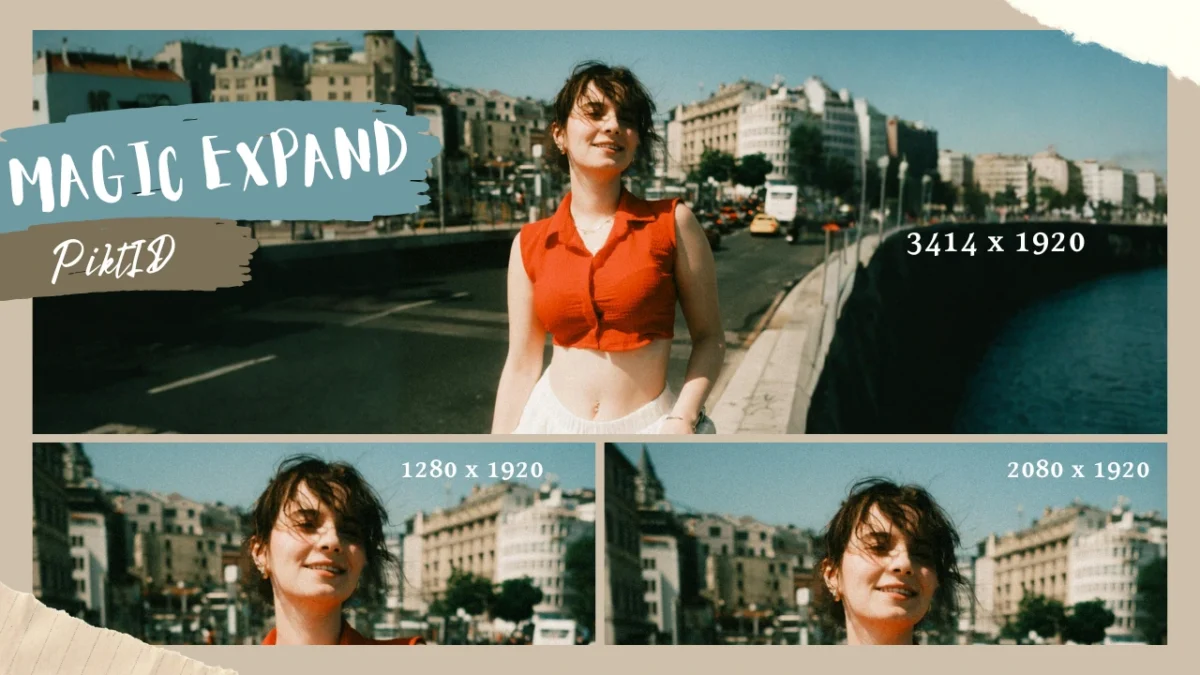
AI-powered stretch photo workflows solve this by generating new background space instead of distorting existing content. PiktID provides a professional solution designed specifically for distortion-free expand photo editing suitable for commercial use.
In this guide, you will learn:
- How to stretch photo online without distortion
- Why common tools fail
- Step-by-step methods using AI
- Real-world use cases
- Best practices for professional results
Table of Contents
1. Why Stretching a Photo Matters in Professional Workflows

It is about meeting strict format requirements while preserving quality. When done incorrectly, expand photo adjustments can reduce credibility and harm brand trust.
i. Understanding When You Stretch Photo Layouts
There are many real-world situations where teams must expand photo dimensions:
- Marketplace product image requirements (Amazon, Flipkart, Shopify)
- Responsive website banners that require wider layouts
- Multi-format advertising creatives (square, vertical, horizontal)
- Print and editorial layouts with fixed aspect ratios
In these scenarios, simply resizing does not work. The layout demands additional space.
The challenge is stretching the photo without damaging the subject.
ii. Difference Between Resizing and Stretching
Many people confuse resizing with stretching.
Here is the difference:
- Resizing scales the entire image proportionately.
- Stretching changes only width or height independently.
When you resize, everything remains balanced.
When you expand photo dimensions unevenly using basic tools, distortion becomes likely.
Risks of simple pixel stretching include:
- Faces appearing wider or thinner
- Products losing symmetry
- Background textures becoming unnatural
Understanding this difference is critical before choosing how to stretch photo content.
iii. Why Traditional Tools Fall Short
Common problems with traditional tools:
- Pixel-based stretching causes warping
- No awareness of subjects versus background
- Fabric and skin textures degrade
- Edges lose clarity
- Manual retouching becomes necessary
These tools treat the image as a flat grid of pixels. They do not understand depth, lighting, or human proportions.
As a result, stretching becomes a compromise instead of a solution.
iv. Commercial Impact of Distorted Images
In business environments, distorted images are not just a design flaw. They have a measurable impact.
When teams stretch photo layouts incorrectly:
- E-commerce listings can lose conversion
- Ad creatives may see lower click-through rates
- Brand perception may decline
- Customers may question product authenticity
Research in digital marketing consistently shows that image quality influences buying decisions. Even subtle distortion introduced while you stretch photo content can reduce perceived professionalism.
For commercial use, expand photo workflows must prioritize:
- Subject protection
- Texture preservation
- Lighting consistency
- High-resolution output
This is where AI-powered solutions like PiktID provide a significant advantage. Instead of pulling pixels, they intelligently expand the canvas while maintaining realism.
In professional workflows, stretching is not the goal. Accurate adaptation without distortion is.
2. What Happens When You Stretch Photo Incorrectly

Improper stretching can damage realism, reduce quality, and affect how professional the image appears. Here is what typically goes wrong.
i. Aspect Ratio Distortion
One of the most common problems when you stretch photo dimensions incorrectly is aspect ratio distortion.
This happens when width or height is changed independently without protecting the subject.
Common results include:
- Faces appearing wider or longer than natural
- Bodies looking compressed or unnaturally tall
- Products losing symmetry
- Logos appearing stretched or skewed
Human eyes are highly sensitive to proportion errors. Even small distortions can make a stretch photo look fake or untrustworthy.
For e-commerce and advertising, this directly impacts credibility.
ii. Texture and Detail Degradation
Another major issue when you stretch photo pixels directly is texture breakdown.
Instead of adding new visual information, basic tools simply pull existing pixels outward.
This causes:
- Clothing folds to look smeared
- Fabric patterns to warp
- Skin texture to blur or stretch unnaturally
- Hard surfaces like metal or wood to appear distorted
In product photography, texture accuracy influences perceived quality. A poorly stretched photo can make premium materials look cheap.
iii. Loss of Resolution
When you stretch photo size without adding new detail, resolution suffers.
Typical quality problems include:
- Blurry edges
- Soft outlines around subjects
- Inconsistent pixel density
- Visible pixelation in print
Many free online tools that allow users to expand photo dimensions do not regenerate detail. They simply enlarge existing pixels.
This may look acceptable on small screens but fails in:
- High-resolution ads
- Print materials
- Large website banners
If quality matters, basic stretch tools are not enough.
3. How AI Changes the Way You Stretch Photo Online
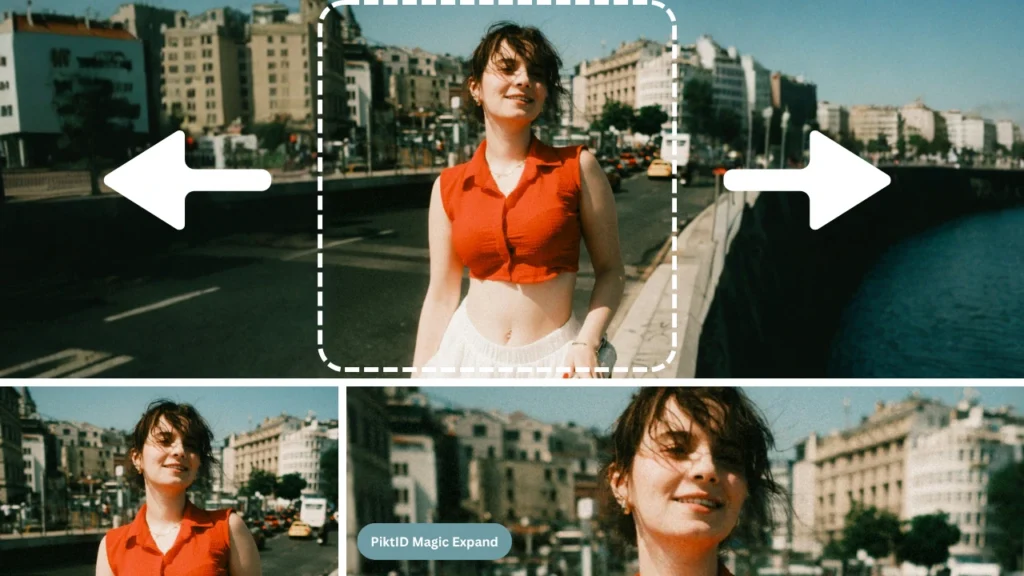
Modern AI tools have changed how professionals expand photo layouts. Instead of stretching pixels blindly, AI understands the structure of the image. This makes a significant difference in commercial use cases.
i. Content-Aware Photo Stretching
AI-powered stretch photo workflows are content-aware.
This means the system:
- Identifies the main subject
- Separates background from foreground
- Understands lighting and perspective
- Expands only appropriate areas
Instead of stretching the entire image, AI allows selective expansion.
For example:
- Background space can be extended
- Empty sky can be widened
- Studio backdrops can be expanded
All without affecting the subject.
ii. Subject Preservation
When you stretch photo content with AI, subject preservation becomes the priority.
AI protects:
- Facial proportions
- Body geometry
- Product dimensions
- Logo alignment
This prevents the unnatural distortions commonly seen in traditional stretch photo edits.
For commercial photography, preserving subject accuracy is essential for maintaining trust and brand integrity.
iii. Background Generation Instead of Pixel Pulling
Traditional tools pull existing pixels outward. AI does something different.
Instead of stretching, it generates new background content that:
- Matches original lighting
- Continues textures naturally
- Maintains depth and perspective
- Blends seamlessly with existing elements
This approach produces a stretch photo result that looks intentional rather than edited.
In professional workflows, background generation is far more reliable than simple pixel stretching.
iv. Why This Matters for Businesses
When brands stretch photo layouts correctly using AI:
- Product visuals remain accurate
- Campaign creatives look consistent
- Website banners maintain realism
- Print outputs stay sharp
Stretching a photo should improve layout flexibility — not compromise visual integrity.
AI-based stretch photo tools, such as those offered by PiktID, are designed to:
- Protect subjects
- Expand backgrounds intelligently
- Maintain texture and detail
- Deliver production-ready results
This is the difference between casual image editing and professional image adaptation. Feel free to learn more about AI Outpainting by PiktID’s Magic Expand.
4. PiktID Approach to Stretching Photos Without Distortion

While other tools may work for casual edits, they often:
- Pull pixels unnaturally
- Distort faces or products
- Reduce image sharpness
- Require manual corrections afterward
PiktID takes a different approach. Instead of simply stretching pixels, it uses AI to expand images intelligently, preserving realism and commercial quality.
i. Intelligent Background Expansion (Edit Background Tool)
Most online tools stretch photo dimensions by dragging edges. This often causes distortion in the subject.
PiktID’s Edit Background tool works differently. It expands the canvas while preserving the subject.
Key advantages:
- The subject remains unchanged
- Background areas are extended naturally
- No warping of faces, bodies, or products
- Clean edge separation between subject and environment
When you expand photo layouts using this method, the expansion looks intentional rather than manipulated.
Lighting and perspective are also preserved. This prevents common issues such as:
- Shifted shadows
- Misaligned backgrounds
- Depth inconsistencies
The result is a visually balanced image suitable for professional use.
ii. AI-Powered Stretch Workflows
Top blogs about how to stretch photo online often recommend manual resizing followed by retouching. That process is time-consuming and skill-dependent.
PiktID uses AI-powered workflows to:
- Generate new background areas instead of stretching existing pixels
- Match lighting direction automatically
- Maintain consistent color tone
- Preserve textures such as fabric, skin, and surfaces
Instead of distorting the image, AI fills new space logically.
This makes it possible to expand photo compositions for:
- Website banners
- Marketplace listings
- Ad creatives
- Social media formats
without sacrificing realism.
iii. Optional Identity Continuity with Swap
One common issue when adapting multiple formats is identity inconsistency.
If you stretch photo layouts across campaigns, you may need the same model or face to appear consistently.
PiktID’s Swap feature allows:
- Consistent facial identity across variations
- Stable campaign visuals across different aspect ratios
- Reliable outputs for catalogs and lookbooks
This is especially useful in:
- Fashion campaigns
- E-commerce catalogs
- Multi-region advertising
Instead of re-editing each version manually, identity remains controlled and consistent.
iv. Upscale for Professional Output
Another common complaint in expand photo tutorials is loss of sharpness.
When image dimensions increase, resolution often decreases.
PiktID’s Upscale feature restores:
- Edge clarity
- Texture detail
- High-resolution sharpness
This is critical for:
- Print materials
- High-resolution displays
- Product zoom features in e-commerce
Stretching without upscaling can lead to blurry output. Upscale ensures final delivery is production-ready. Find out what is Outpainting by PiktID?
5. Step-by-Step Guide: How to Stretch Photo with PiktID
Below is a practical, easy-to-follow process.

a. Step 1 – Upload High-Quality Source Image
Start with the best version of your image.
Best practices:
- Use the highest resolution available
- Avoid compressed or low-quality files
- Ensure clear separation between subject and background
Higher input quality improves how AI processes stretch photo adjustments.
b. Step 2 – Expand Canvas Using Edit Background
Instead of dragging the image outward, adjust the canvas.
You can:
- Select horizontal expansion for banners
- Select vertical expansion for social formats
- Adjust to marketplace or ad layout requirements
This method prevents distortion because the subject is not stretched directly.
c. Step 3 – Guide AI for Contextual Extension
In some cases, additional guidance improves results.
You may:
- Use simple prompts to describe background type
- Specify lighting direction if needed
- Preview the output before finalizing
Previewing ensures the stretch photo output aligns with your design goals.
d. Step 4 – Apply Upscale for Final Delivery
After stretching and expansion:
- Enhance sharpness
- Improve texture clarity
- Prepare for print or high-resolution publishing
This step is especially important for commercial visuals.
Optional – API Workflow for Enterprise Scaling
For teams managing large catalogs or campaigns, manual editing is not scalable.
PiktID supports API workflows that allow you to stretch photo layouts programmatically.
Enterprise benefits include:
- Batch processing of multiple images
- Automated resizing for different aspect ratios
- Integration into existing design pipelines
- Consistent output standards across teams
This transforms stretch photo editing from a manual task into a scalable system.
By combining intelligent background expansion, AI-generated content, identity consistency, and resolution enhancement, PiktID enables professionals to expand photo layouts without distortion while maintaining realism and commercial integrity.
6. Best Practices for Stretching Photos Without Distortion

If you stretch photo layouts for e-commerce, advertising, or print, quality and realism matter. Below are proven best practices to expand photo images without distortion.
i. Focus on Expanding Backgrounds, Not Key Subjects
The most important rule when you stretch photo layouts is simple:
Do not stretch the subject.
Stretching faces, bodies, or products directly can cause:
- Warped facial features
- Altered product proportions
- Unnatural body shapes
- Reduced trust in visuals
Instead:
- Expand background space
- Regenerate surrounding areas
- Keep the main subject untouched
Modern AI tools allow you to stretch photo layouts by generating new background content rather than pulling pixels across the image.
ii. Maintain Original Composition Hierarchy
When you stretch photo content, you must preserve the visual balance.
Composition hierarchy means:
- The subject remains the focal point
- Background elements do not overpower the foreground
- The image still “feels” natural
Before stretching, ask:
- Where is the subject positioned?
- Will expansion shift attention away from it?
- Does the layout still look intentional?
Good stretch photo workflows adapt the layout without breaking visual storytelling.
iii. Use AI Regeneration Instead of Simple Pixel Stretch
Most basic online tools stretch photo pixels directly. This leads to:
- Smearing of textures
- Repeated patterns
- Distorted edges
AI regeneration works differently.
Instead of stretching existing pixels, AI:
- Creates new background content
- Matches lighting and tone
- Preserves depth and perspective
This is especially important for commercial use where even small distortions can reduce conversion rates.
iv. Always Upscale Final Output for Quality
When you stretch photo dimensions, resolution may decrease. Enlarging an image does not automatically add detail.
To maintain professional quality:
- Apply AI-based upscaling after stretching
- Restore sharpness and texture
- Enhance edge clarity
This is critical for:
- Print materials
- High-resolution ads
- Product listings
Skipping this step often results in soft or blurry visuals.
v. Preview on Target Devices or Placement Formats
An image may look fine on a desktop screen but appear distorted on:
- Mobile devices
- Marketplace thumbnails
- Social media previews
- Print layouts
After you stretch photo content:
- Preview in actual placement format
- Check cropping behavior
- Confirm subject proportions remain natural
Professional workflows test visuals before publishing. PiktID also has a guide about Stretch image using Magic Expand.
7. Common Stretch Photo Mistakes & How to Fix Them
Even with the right tools, mistakes can happen when you stretch photo layouts. Below are the most common issues and how to correct them.

i. Subject Distortion
This happens when the foreground is included in the stretch area.
Common signs:
- Faces look wider or taller
- Bodies appear compressed
- Products lose symmetry
Fix:
- Reduce stretch impact on the foreground
- Protect subject areas using masking
- Expand background instead of scaling the entire image
If distortion is visible, revert and adjust the expansion strategy.
ii. Blurry Output
Stretching often spreads existing pixels across a larger area.
This causes:
- Soft textures
- Blurred edges
- Reduced clarity
Fix:
- Use AI-based upscaling after you stretch photo dimensions
- Avoid repeated stretching cycles
- Start with the highest resolution source image possible
Quality recovery is essential for professional results.
iii. Lighting or Shadow Inconsistency
When background areas are extended manually, lighting may not match the original image.
You may notice:
- Shadow direction changes
- Uneven brightness
- Color tone mismatches
Fix:
- Use content-aware AI blending
- Maintain consistent light direction during expansion
- Regenerate extended areas instead of copying patterns
Realistic lighting continuity is critical when you stretch photo layouts for advertising or e-commerce.
iv. Final Note on Stretch Photo Workflows
- Proportions
- Texture integrity
- Lighting consistency
- Brand credibility
When you stretch photo images responsibly using AI-driven background expansion and resolution enhancement, you maintain realism while adapting layouts efficiently.
8. Use Cases by Industry

Businesses need ways to stretch photo layouts without distortion, quality loss, or subject warping. Below are the most common professional use cases where stretching photos correctly matters.
i. E-commerce
Online marketplaces like Amazon, Flipkart, Etsy, and Shopify often require strict image ratios. Sellers frequently need to stretch photo layouts to meet listing standards without re-shooting products.
Common needs include:
- Converting square product images into horizontal banners
- Adding space for text overlays or promotional tags
- Adjusting product framing for mobile-first layouts
Risks of improper stretch photo methods:
- Distorted product proportions
- Misleading size representation
- Reduced buyer trust
Professional approach:
- Expand background instead of stretching the product
- Maintain original shape and symmetry
- Preserve fabric texture and surface details
AI-powered stretch photo workflows help maintain realism, which directly impacts conversion rates.
ii. Marketing & Advertising
Ad platforms require multiple image formats for the same campaign.
A single product image may need to work as:
- Facebook and Instagram ads
- Google Display banners
- Website hero images
- Email headers
Manually editing each format is time-consuming. Simple stretch photo tools often warp faces or products.
Professional stretch photo workflows enable:
- Multi-format ad adaptation
- Consistent lighting and tone
- Fast campaign scaling
Instead of pulling pixels, AI-based stretching expands layout space while protecting subjects.
iii. Publishing & Design
Designers regularly need to stretch photo layouts to fit fixed editorial grids.
Common scenarios:
- Magazine spreads
- Print posters
- Website headers
- Blog feature images
Improper stretch photo techniques can cause:
- Blurry edges
- Visible texture repetition
- Misaligned perspective
Professional tools allow designers to extend backgrounds logically while preserving composition hierarchy.
iv. Enterprise & Brand Media
Large brands manage thousands of visual assets across platforms.
They often need to stretch photo layouts to:
- Standardize global campaign formats
- Maintain uniform aspect ratios
- Scale visual production efficiently
Enterprise-level stretch photo workflows must ensure:
- Consistent brand representation
- No subject distortion
- Predictable high-resolution output
- Integration with internal systems
AI-based solutions like PiktID provide scalable stretch photo capabilities that align with commercial and compliance requirements. For further information take a look at our guide about AI Image Stretcher
9. Comparison Table: Stretch Photo Tools

Below is a practical comparison based on capabilities commonly evaluated by users searching for stretch photo tools.
| Feature | PiktID | Basic Online Editors | Photoshop | Canva |
| AI subject protection | Yes | No | Partial | Limited |
| Background-aware expansion | Yes | No | Manual | No |
| High-resolution output | Yes | Limited | Yes | Limited |
| Commercial-ready visuals | Yes | No | Skill-dependent | No |
| API integration | Yes | No | Limited | No |
Why This Matters
Basic Online Editors:
- Typically rely on pixel stretching
- Often cause distortion
- Not built for professional use
Photoshop:
- Powerful but manual
- Requires advanced skills
- Time-intensive for bulk editing
Canva:
- Easy for casual edits
- Limited stretch photo intelligence
- Not designed for distortion-free expansion
PiktID:
- Uses AI to protect subjects
- Expands backgrounds intelligently
- Maintains lighting and texture consistency
- Supports scalable workflows
When visual quality affects conversions, brand credibility, or print output, the method you use to stretch photo layouts directly impacts business results.
10. Ethics and Compliance in Photo Stretching

If you stretch photo content for e-commerce, advertising, or publishing, you are not just editing pixels. You are influencing perception, trust, and potentially compliance.
Professional image stretching must balance flexibility with responsibility.
i. Avoid Misleading Visual Alteration
When you stretch photo layouts, the goal is to adapt the format — not change the truth. You should never:
- Alter product dimensions to make items look larger or slimmer
- Stretch packaging to exaggerate size
- Modify furniture proportions to mislead customers
- Change the visual balance in a way that affects buyer expectations
In e-commerce, distorted product visuals are one of the top causes of:
- Increased return rates
- Customer complaints
- Loss of trust
- Lower conversion rates
Best practice when you stretch photo images:
- Expand background areas instead of modifying the subject
- Preserve original proportions of products and people
- Ensure the final result matches the real-world item
Professional AI workflows, such as those used in PiktID, protect subject proportions while allowing layout flexibility.
ii. Identity Protection
When you stretch photo content that includes people, identity preservation is critical. Improper stretching can:
- Distort facial structure
- Change body proportions
- Create unrealistic or misleading visuals
This is especially risky in:
- Fashion campaigns
- Corporate media
- Editorial publishing
- Healthcare and finance marketing
To stay compliant and ethical:
- Avoid stretching across faces or key facial features
- Maintain natural proportions
- Use AI tools that detect and protect human subjects
When identity risks are high, synthetic identities may be more appropriate. This ensures you can stretch photo layouts without altering a real person’s appearance.
iii. Regulatory Compliance
Stretching images in commercial environments must align with privacy and data regulations. If identifiable individuals appear in the image:
- Confirm usage rights and consent
- Avoid unnecessary facial or identity manipulation
- Keep documentation of image editing workflows
For companies operating globally, GDPR and other data protection regulations may apply. When you stretch photo visuals for business use, compliance protects both brand reputation and legal standing.
11. Conclusion

Stretch photo online is no longer a niche editing task. It has become a day-to-day requirement for people and teams who publish visuals across websites, ads, and marketplaces.
Traditional stretch photo methods usually work by pulling pixels across width or height. This is fast, but it often creates the exact problems users complain about:
- Warped faces and products
- Smeared textures (fabric, skin, surfaces)
- Soft or blurry output after stretching
That gap is why AI-based workflows are replacing basic pixel stretching for professional use. Instead of forcing the whole image to stretch photo dimensions evenly, AI can expand only the background, preserve the subject, and keep edges looking natural—especially important for ads and e-commerce visuals.
PiktID is built for this professional reality. When you need to stretch photo layouts without distortion, PiktID’s workflow is designed to protect what matters most in commercial images:
- Subject integrity (faces, bodies, products remain unchanged)
- Realistic background expansion that avoids obvious artifacts
- Production-ready output that can be enhanced further for clarity
Across industries, stretch photo requests are usually driven by practical constraints, not creativity:
- E-commerce: fit marketplace ratios without misrepresenting products
- Marketing & advertising: produce multiple creative sizes without reshoots
- Design & publishing: adapt layouts for banners, hero sections, and print
- Enterprise media: standardize visual formats across teams and regions
Ready to stretch photos online without distortion? Try PiktID’s Edit Background and Magic Expand with 10 free credits.
Visit https://studio.piktid.com/expand/ to get started today.
12. FAQs – Stretch Photo Online

1. What does it mean to stretch photo online?
To stretch a photo online means adjusting the width or height of an image independently to fit a specific layout.
Unlike resizing, stretching changes proportions unevenly. If done incorrectly, it can distort faces, products, or textures. Professional tools focus on expanding backgrounds instead of pulling pixels.
2. How do you stretch a photo without distortion?
To stretch photo content without distortion:
- Expand background areas instead of the subject
- Preserve original proportions
- Use AI-powered tools that understand image structure
Traditional pixel stretching causes warping. AI-based expansion generates new background space instead.
3. Is it safe to stretch photo images for e-commerce?
Yes, but only if done correctly. For e-commerce:
- Do not change product shape or dimensions
- Maintain realistic proportions
- Avoid exaggeration
Distorted product visuals reduce trust and increase return rates. Safe stretch photo workflows focus on layout adaptation, not visual manipulation.
4. Can I stretch photo backgrounds online?
Yes. Many online tools allow background expansion. However, simple tools may stretch pixels instead of generating new content. AI-powered platforms expand backgrounds intelligently while protecting the subject. This is especially useful for banners, marketplace ratios, and social media formats.
5. Does PiktID support professional photo stretching?
Yes. PiktID supports professional stretch photo workflows by:
- Expanding backgrounds instead of distorting subjects
- Maintaining lighting and perspective consistency
- Providing high-resolution output
- Supporting commercial use cases
It is built for production-ready visuals in e-commerce, advertising, and enterprise media.
6. What’s the difference between stretching and resizing a photo?
Resizing scales an image proportionally. Everything gets bigger or smaller evenly. Stretching changes only width or height, which can distort shapes if done incorrectly. If you need format flexibility without distortion, background expansion is preferred over direct stretching.
7. How do I keep quality when I stretch photo dimensions?
To maintain quality:
- Start with high-resolution images
- Avoid stretching through important subjects
- Use AI regeneration instead of pixel pulling
- Apply upscaling after layout changes
Direct pixel stretching often reduces clarity and texture quality.
8. Which AI tool is best for stretching photos professionally?
The best tool should:
- Protect subject proportions
- Expand backgrounds intelligently
- Maintain lighting and perspective
- Deliver high-resolution output
- Support commercial compliance
When businesses stretch photo content responsibly, they maintain trust, protect identity, and ensure compliance — while still achieving layout flexibility. Ethical image adaptation is not optional. It is part of professional visual production.