
Estimated reading time: 17 minutes
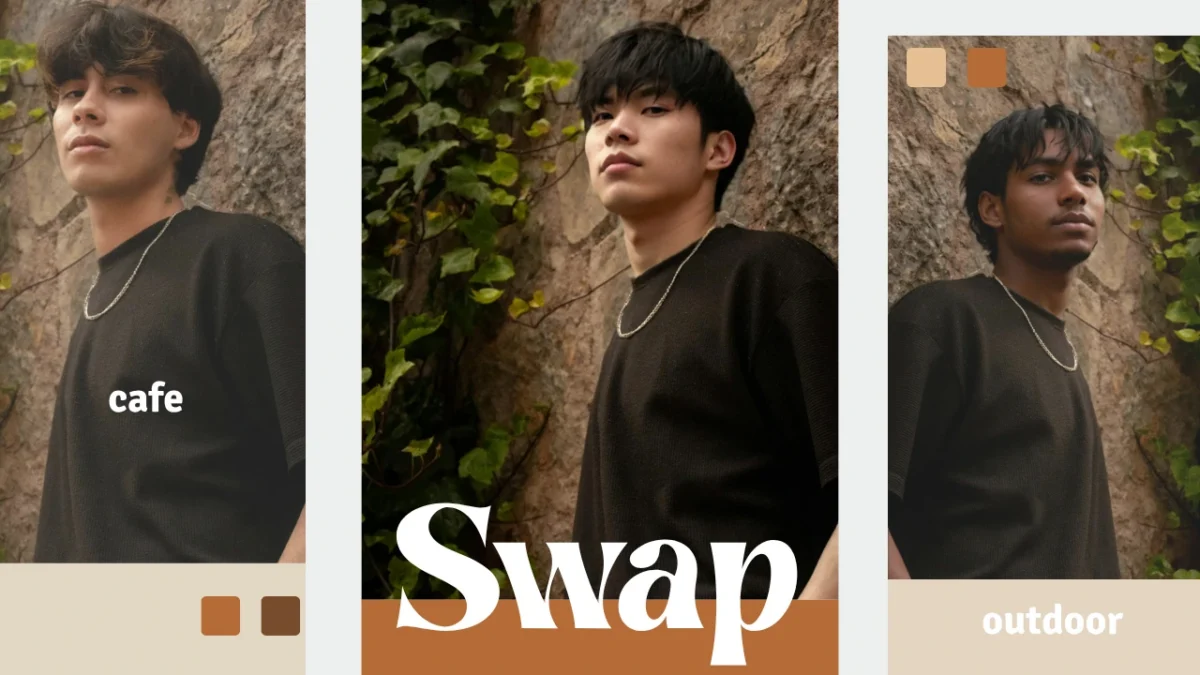
To swap bodies online means using artificial intelligence to replace one person’s body or full identity in a photo with another, while keeping the image realistic and visually consistent.
This is very different from simple face swap apps.
- Full-body replacement, not just facial edits
- Realistic lighting and shadow matching
- Natural posture and proportion alignment
- Clean background blending
- Results that do not look fake or pasted
Traditional editing requires manual masking, blending, and retouching. It is time-consuming and skill-heavy. AI-powered workflows now make it possible to swap bodies efficiently, accurately, and at scale.
On-model is built for professional, high-fidelity body swap workflows. Instead of novelty edits, it focuses on:
- Proportion accuracy
- Lighting preservation
- Fabric and garment integrity
- Production-ready export quality
For e-commerce, fashion, marketing, and creative production, the ability to swap bodies without re-shooting photos can dramatically reduce costs while maintaining brand consistency.
Table of Contents
1. What Does It Mean to Swap Bodies Online?

i. Simple Definition
To swap bodies online means using AI to replace one person’s body in a photograph with another person’s body or identity, while maintaining:
- Scene consistency
- Pose alignment
- Lighting continuity
- Background integrity
The goal is not simply to overlay one image on another. It is to create a seamless result that looks like the final image was originally photographed that way.
ii. How It Differs from Face Swap
Many people confuse swapping faces with swapping bodies. They are technically very different processes.
Face swap:
- Changes only the facial area
- Keeps the original body and posture
- Often used for entertainment or novelty edits
Swap bodies:
- Replaces the entire body or model identity
- Requires alignment of shoulders, torso, limbs, and proportions
- Must preserve clothing fit and fabric realism
- Needs consistent lighting and shadow blending
When you swap bodies, the AI must understand:
- Body structure and anatomy
- Camera angle and depth
- Clothing folds and garment tension
- Environmental lighting direction
This is why professional-grade tools like On-model outperform casual apps. Body swap requires context awareness, not just simple overlay.
iii. Common Use Cases
When users look at “swap bodies,” they are often exploring both creative and commercial scenarios. The most common professional use cases include:
Product model replacement for catalogs
- Replace models without reshooting
- Adapt imagery for different demographics
- Maintain consistent garment presentation
Multi-persona ad creatives
- Test multiple audience variations
- Personalize campaigns without full production cycles
- Generate regional content efficiently
Visual consistency for brand campaigns
- Maintain a consistent model identity across product lines
- Create scalable visual libraries
- Standardize assets for global teams
In fashion and e-commerce especially, swapping bodies allows brands to:
- Reduce production costs
- Increase campaign speed
- Maintain high visual standards
On-model supports these workflows with AI trained for realism, proportion accuracy, and lighting preservation — making it suitable for professional use rather than casual experimentation. Refer to our guide about AI Body Generator
2. Why Traditional Tools Fall Short

i. Casual Apps Lack Context Awareness
Many casual tools approach swap bodies as a novelty feature.
Typical limitations include:
- No understanding of pose alignment
- No detection of body proportions
- Minimal background blending
- Basic cut-and-paste logic
As a result, when you swap bodies using these tools, the output may look acceptable on a phone screen but fail under closer inspection.
ii. Unrealistic Lighting and Shadow Mismatch
One of the most common issues seen in top free tools:
- Lighting direction does not match
- Shadows fall inconsistently
- Skin tones clash with the scene
When you swap bodies without AI context awareness, the lighting of the new body rarely matches the original environment. This creates a visible “pasted” effect.
For e-commerce, fashion, or marketing, even small lighting inconsistencies reduce perceived quality and trust.
iii. Awkward Proportions and Distortion
Body swap tools that do not analyze anatomy often produce:
- Heads that are too large or too small
- Misaligned shoulders and neck placement
- Arms and legs that do not follow natural posture
iv. Manual Editing Is Slow and Skill-Dependent
Photoshop-based workflows can technically swap bodies, but:
- They require advanced masking and blending skills
- Lighting corrections must be done manually
- Shadow recreation is time-consuming
- Results vary depending on designer expertise
For teams producing high volumes of images, this is not scalable.
v. Free Online Tools Focus on Speed, Not Fidelity
Tools like Fotor’s body swap provide quick results and are popular for casual edits. However:
- They prioritize simplicity over accuracy
- Fine details like fabric folds and edge blending are limited
- Outputs may not meet commercial standards
For professional workflows, “fast” is not enough. The goal is to swap bodies while preserving realism, proportion, and visual credibility.
3. How AI-Powered Body Swap Works

Modern AI approaches swap bodies very differently from traditional apps.
Instead of copying and pasting elements, AI models analyze the full image context before making changes.
i. AI Understands Pose and Proportions
When you swap bodies using advanced AI, the system first analyzes:
- Body structure
- Pose alignment
- Camera angle
- Perspective depth
This allows the AI to:
- Align shoulders and torso naturally
- Match head-to-body ratios correctly
- Maintain anatomical realism
Rather than stretching or resizing arbitrarily, AI remaps the replacement body to fit the original composition.
This is critical for fashion, catalog photography, and advertising visuals.
ii. Context-Aware Rendering
Context-aware AI does not treat the body as an isolated object.
It evaluates:
- Ambient lighting
- Shadow direction
- Background color temperature
- Scene depth
When you swap bodies using context-aware rendering:
- Shadows are recalculated
- Highlights align with light sources
- Edges blend smoothly into the environment
This avoids the obvious “sticker effect” common in simple tools.
For professional use, context-aware rendering is what separates entertainment-grade swaps from production-ready visuals.
iii. Texture and Garment Integrity
One of the biggest concerns in body swap workflows is clothing distortion.
Poor tools often:
- Smear fabric textures
- Flatten folds
- Break garment structure
Advanced AI models preserve:
- Fabric folds and stitching
- Natural draping of clothing
- Skin texture and surface detail
This matters significantly in:
- Fashion lookbooks
- E-commerce apparel listings
- Campaign imagery
When you swap bodies for commercial use, garment integrity is not optional. It directly affects product representation and customer trust.
In summary:
Casual tools make it easy to swap bodies quickly, but they often sacrifice realism.
Manual editing offers control, but it is slow and inconsistent.
AI-powered workflows bridge this gap by:
- Understanding pose and anatomy
- Matching lighting and shadows
- Preserving texture and fabric detail
For professional teams, the goal is not just to swap bodies.
It is to do so in a way that looks intentional, natural, and production-ready. PiktID Studio offers a guide for marketers about How to create AI model Girl Online.
4. On-model’s Professional Approach to Swap Bodies

What is often missing is a professional workflow designed for commercial output.
On-model approaches swap bodies differently. Instead of focusing on novelty, it focuses on realism, lighting accuracy, and production-quality results suitable for real business use.
On-model’s body swap features are designed for creative teams, brands, fashion houses, and e-commerce businesses that need high-fidelity visuals — not meme-style edits.
i. Intelligent Identity Replacement
Professional swap bodies workflows must do more than replace one body with another. They must preserve context.
On-model analyzes both the base image and the target image before performing the swap bodies process. It evaluates:
- Body proportions
- Pose alignment
- Camera angle
- Lighting direction
- Shadow intensity
This ensures the replacement does not look pasted or artificial.
Unlike many online tools that simply overlay one subject onto another, On-model respects anatomical structure and environmental consistency. The result is a realistic body swap that blends naturally with the original scene.
ii. High-Quality Output
Many online results for swap bodies produce images suitable for social media fun — but not for commercial publishing. On-model is built for production use.
When you swap bodies using On-model, the output is suitable for:
- E-commerce product catalogs
- Fashion lookbooks
- Social media ad creatives
- Brand campaigns
- Editorial content
- Website hero banners
Professional quality means:
- Clean edges
- Accurate lighting
- Preserved garment folds
- Natural skin tones
- High-resolution export
This level of detail is essential when visuals represent a product or brand.
iii. Consistent Identity Across Assets
One of the biggest challenges in visual marketing is maintaining identity consistency across campaigns. With On-model, brands can:
- Create and reuse a consistent “digital model” identity
- Swap bodies across multiple outfits or product variations
- Maintain brand recognition across ads and platforms
Instead of organizing repeated photoshoots, teams can swap bodies across existing assets while preserving realism. This reduces production costs and increases creative flexibility without compromising quality. For beginners we have a quick guide about AI Model Swap.
5. Step-by-Step Guide: How to Swap Bodies with On-model

Below is a professional workflow designed for realistic results.
a. Step 1 – Upload Source Image
Start with a high-resolution, cleanly framed image.
For best results:
- Use sharp, well-lit photos
- Avoid heavy shadows across the body
- Ensure the subject is clearly visible
- Maintain natural posture
The better the input, the better the swap bodies outcome.
b. Step 2 – Upload Target Identity or Model
Next, upload the body or identity you want to use.
On-model’s AI will:
- Map body structure
- Analyze proportions
- Align posture
- Match lighting conditions
This step is critical to prevent distortion or unrealistic blending.
Choosing images with similar pose and camera angle improves the final result significantly.
c. Step 3 – Configure Swap Settings
Before finalizing the swap bodies process, refine alignment.
You can:
- Adjust pose matching
- Refine edge blending
- Ensure garment positioning looks natural
- Preview lighting consistency
This extra control ensures the result looks intentional and professional — not automatic.
d. Step 4 – Finalize and Export
Preview the output carefully.
Look for:
- Natural posture
- Correct lighting direction
- Consistent shadows
- Clean edges
Once satisfied, export in high resolution.
On-model supports output suitable for:
- Web publishing
- Social advertising
- Print catalogs
- Large-format visuals
The goal is not just to swap bodies — but to deliver production-ready visuals that hold up under professional scrutiny.
By combining intelligent identity analysis, proportion mapping, and lighting preservation, On-model provides a professional solution for swap bodies that goes far beyond casual editing tools. Something like a Realistic Female Mannequin by PiktID Studio.
6. Best Practices for Realistic Body Swap Results

Most tools promise quick results, but high-quality outcomes depend heavily on how you prepare your images. If your goal is to swap bodies for professional use — not just entertainment — follow these proven best practices.
i. Use Images with Consistent Lighting
Lighting consistency is one of the most important factors when you swap bodies.
Before starting:
- Check where the light is coming from (left, right, front, top)
- Compare shadow direction in both images
- Ensure similar brightness and contrast levels
If the source image has strong side lighting and the target image has flat studio lighting, the swap bodies result may look artificial. Professional AI systems like On-model analyze lighting direction to reduce mismatch, but starting with compatible images significantly improves results.
ii. Choose Similar Pose and Angle
When you swap bodies, pose alignment determines how natural the result looks.
To improve realism:
- Match camera angle (eye-level, top-down, side view)
- Use similar posture (standing straight, sitting, walking)
- Avoid mixing wide-angle shots with tight portrait shots
If body posture does not structurally align, the final image may appear stretched or misaligned.
iii. Use High-Resolution Images
Low-resolution images limit AI accuracy.
For best results when you swap bodies:
- Use high-quality, clear photos
- Avoid blurry or heavily compressed files
- Ensure subject edges are well defined
High-resolution input helps AI preserve clothing texture, skin detail, and garment structure — especially important in fashion and e-commerce applications.
iv. Always Preview Before Export
Even the best AI workflow benefits from review.
Before finalizing a swap bodies result:
- Zoom into facial edges and shoulder areas
- Check clothing folds and neckline transitions
- Verify that lighting blends naturally
Previewing prevents small errors from appearing in published ads or product listings. AI Fashion Photography tips by PiktID’s On-model App.
7. Common Mistakes and How to Avoid Them

Even with advanced AI, poor preparation can create unrealistic outcomes. Below are the most common problems users face when trying to swap bodies — and how to fix them.
i. Lighting Mismatch
This occurs when the source and target images have different light directions or intensity.
Common signs:
- Shadows fall in opposite directions
- Skin tone appears unnaturally blended
- Highlights do not align with the environment
How to fix it:
- Use images with similar lighting conditions
- Avoid mixing outdoor sunlight with indoor studio lighting
- Choose balanced, evenly lit photos when possible
Professional AI tools like On-model help compensate for lighting differences, but strong mismatches still affect realism.
ii. Proportion Distortion
Proportion distortion happens when the body structure and identity do not align properly.
This often occurs when:
- One image is taken from a different focal length
- The head tilt or shoulder angle does not match
- The body frame differs significantly in scale
How to fix it:
- Select images with similar body posture
- Match camera height and angle
- Avoid extreme perspective differences
When you swap bodies using context-aware AI, proportion alignment improves, but source compatibility remains critical.
iii. Background Discontinuity
Background discontinuity is a common issue in free or casual body swap tools.
It appears when:
- Edges look cut out or pasted
- Shadows do not blend into the scene
- Clothing overlaps incorrectly with background elements
How to fix it:
- Use AI that preserves background continuity
- Avoid tools that only paste body layers without context analysis
- Ensure the subject separation is clean before swapping
On-model’s workflow analyzes both subject and background to maintain environmental consistency, which reduces the artificial look common in basic swap bodies apps.
iv. Why These Best Practices Matter
- Realism
- Lighting accuracy
- Proper proportions
- Commercial usability
If you are using AI to swap bodies for fashion catalogs, ad creatives, product photography, or marketing campaigns, these factors directly influence credibility and conversion. Following structured preparation steps ensures that your swap bodies results are not only visually impressive, but also production-ready.
8. Use Cases by Industry

i. E-commerce
Online stores rely on consistent, high-quality visuals to drive conversions. When you need to swap bodies in product photos, On-model helps maintain a professional look without re-shooting.
- Swap models to fit regional targets: Many e-commerce brands create visual variations for different markets. Instead of organizing new photoshoots for every demographic, you can swap bodies to represent diverse customer segments accurately and quickly.
- Maintain consistent product imagery across SKUs: For multi-SKU listings (e.g., apparel sizing or color variants), consistent body presentation increases trust and reduces returns. On-model ensures every variant looks cohesive without distortion.
ii. Fashion & Apparel
In fashion, visuals drive desire. Designers and visual directors often have tight deadlines and high expectations for lookbooks and promotional content.
- Create seasonal lookbooks without reshoots: Instead of staging expensive seasonal photoshoots, fashion teams can swap bodies into existing images. This enables cohesive seasonal lookbooks with rapid turnaround.
- Test diverse demographic representations: Inclusive visuals are increasingly a priority in fashion. On-model allows teams to swap models into shots in a way that preserves lighting, proportion, and realism — without compromising the original artistic intent.
iii. Marketing & Advertising
Marketing campaigns demand visuals that capture attention and scale across channels.
- Rapidly produce ad variants: Running multi-format campaigns often requires hundreds of creative variations. Swapping bodies lets marketers generate these variations faster while maintaining narrative consistency.
- Maintain identity consistency across platforms: Campaigns often have a recognizable face or visual identity. On-model allows you to swap bodies or identities while keeping lighting, shadows, and overall composition intact, ensuring a unified visual presence.
Swap bodies reveal a strong interest in tools that can operate at scale — not just one-off edits — making On-model’s workflow especially relevant.
iv. Creative & Editorial
Editorial teams and creative directors often experiment with visuals that tell a story or convey emotion.
- Produce conceptual visuals for storytelling: Whether for blogs, magazines, or brand narratives, swapping bodies enables creators to explore conceptual compositions — such as imagined scenes or narrative variations — without heavy manual editing.
- Use AI for editorial experimentation: Editorial photography can be experimental, and AI-assisted body swap workflows help teams iterate faster, test visual ideas, and refine layouts for publication.
You can also use PiktID on your phone, refer to our guide about How to Face Swap on iPhone.
9. Comparison Table: Body Swap Tools

The table below helps readers understand where On-model fits in among different categories of body swap tools. This version highlights professional performance and production suitability.
| Feature | On-model | Free Online Tools | Basic Apps | Generic AI Tools |
| Realistic body swap | Yes | No | No | Limited |
| Lighting & shadow match | Yes | Partial | No | Partial |
| Export professional output | Yes | Limited | No | Limited |
| Identity reuse | Yes | No | No | No |
| Background preserved | Yes | Partial | No | Partial |
Key distinctions explained:
- Realistic body swap: On-model’s AI analyses pose and proportions, ensuring swapped bodies look natural. Free tools and basic apps often create obvious cutouts or misaligned output.
- Lighting & shadow match: Professional images require continuous lighting — casual tools do not account for this, while On-model uses context-aware algorithms.
- Export professional output: On-model produces high-resolution assets suitable for print, web, and commerce. Many free or basic tools limit resolution or add watermarks.
- Identity reuse: Reusing the same identity across different images helps marketing and branding teams maintain consistency. Only On-model supports this as a core workflow.
- Background preserved: When swapping bodies, background integrity matters. On-model maintains environmental elements instead of forcing awkward fills or visible seams.
10. Ethics & Compliance

When using AI to swap bodies, especially in commercial or public-facing content, the following principles are essential.
i. Respect Consent When Using Real Photos
If you swap bodies using real images of identifiable individuals:
- Ensure you have proper permission or usage rights
- Confirm model releases are in place for commercial work
- Avoid editing images of people without consent
In professional industries like fashion, e-commerce, and advertising, consent is not optional. It protects both the brand and the individuals involved.
ii. Avoid Deceptive Visual Manipulation
You should never:
- Alter body proportions to mislead customers
- Change product fit in a way that misrepresents sizing
- Create unrealistic portrayals of physical attributes
When brands swap bodies in product photos or campaigns, the result must remain truthful. Misleading visuals can damage trust and increase return rates in e-commerce environments.
iii. Use Synthetic Identities or Model Releases Where Applicable
A growing trend in professional AI workflows is the use of synthetic identities. This is especially useful when:
- Consent is unclear
- Large-scale visual variations are required
- Campaigns need regional or demographic adaptation
- Privacy compliance is a priority
Using synthetic identities when you swap, allows businesses to scale visual production without compromising personal data or consent requirements.
iv. Maintain Transparency in Professional Use
Transparency builds long-term credibility. Best practices include:
- Clearly documenting AI-assisted edits
- Maintaining internal guidelines for image modification
- Ensuring teams understand acceptable use policies
Professional body swap workflows should enhance efficiency, not compromise integrity.
11. Conclusion

Modern AI makes it possible to:
- Replace models in product photos
- Create campaign variations without re-shoots
- Adapt visuals for different markets
- Maintain consistent brand identity across platforms
However, quality and realism determine whether the result is usable in professional settings.
On-model’s Body Swap AI is built specifically for commercial workflows. Unlike casual tools that focus on quick effects, On-model prioritizes:
- Proportional accuracy
- Lighting and shadow consistency
- Background preservation
- High-resolution, production-ready output
For industries such as fashion, e-commerce, marketing, publishing, and brand media, the ability to swap bodies with realism and precision enables scalable content creation without sacrificing quality. On-model also supports scalable identity management, allowing teams to maintain consistent digital models across campaigns while respecting compliance and privacy requirements.
Ready to swap bodies online with realistic results? Try On-Model’s Body Swap AI with 10 free credits. Visit https://on-model.com/ to get started today.
12. FAQs

1. What does it mean to swap bodies online?
Swapping bodies online refers to using artificial intelligence to replace a person’s body or identity in a photo with another. This process combines visual elements from two images so that the target body replaces the original one but still looks natural in lighting, posture, and style.
2. How do you swap bodies in a photo using AI?
To swap bodies using AI:
- Upload the photo you want to change
- Upload the photo of the body you want to place instead
- The AI identifies poses, proportions, and lighting
- The system blends the new body into the original scene
Advanced AI body swap tools analyze facial structure, body alignment, and shadows to create seamless, natural results.
3. Can I swap bodies without Photoshop?
Yes. Modern body swap AI tools work entirely online and do not require software like Photoshop. They let you swap with a simple browser interface — upload images, let the AI process, and download the result.
This is one reason body swap features have become popular for users looking to edit photos quickly, without a steep learning curve.
4. Is AI body swap safe for professional use?
AI body swap can be safe for professional use when done responsibly. In professional workflows:
- You preserve proportions and lighting
- You avoid misleading or manipulative edits
- The final image meets quality standards for commercial visuals
Professional tools, unlike casual generators, focus on realism and consistency, making them suitable for e-commerce, fashion, and marketing content.
5. Which tool gives realistic body swap results?
Not all body swap tools produce professional-grade results. Basic free tools may create fun or novelty edits, which can be inconsistent in lighting and proportions.
Professional body swap solutions prioritize:
- Accurate lighting match
- Consistent proportions
- Preserved pose and background context
These results are more suitable for commercial use and brand assets.
6. How do I keep lighting consistent after swapping bodies?
Keeping lighting consistent requires:
- Choosing source and target images with similar lighting
- Using AI that analyzes both images’ shadows and highlights
- Allowing the system to blend adjustments so lighting transitions smoothly
Professional body swap AI tools automatically preserve these visual cues rather than copying and pasting pixels manually.
7. Does AI body swap work with group photos?
Yes, many advanced AI body swap tools can detect multiple subjects in a photo and apply swaps individually. For example, if you have a group photo and want to swap one body while leaving others unchanged, AI can isolate that person and perform the replacement cleanly.
The key is using an AI model capable of multi-person detection and selective swapping rather than basic one-person swaps.
8. How do I ensure correct proportions when swapping bodies?
To ensure correct proportions in outputs:
- Use high-resolution images with clear body outlines
- Choose source and target images where poses are similar
- Use AI tools that understand anatomical structure
Tools that rely on deep learning (not simple cut-and-paste) help maintain natural proportions and avoid distortion. Visit https://on-model.com to get started.