
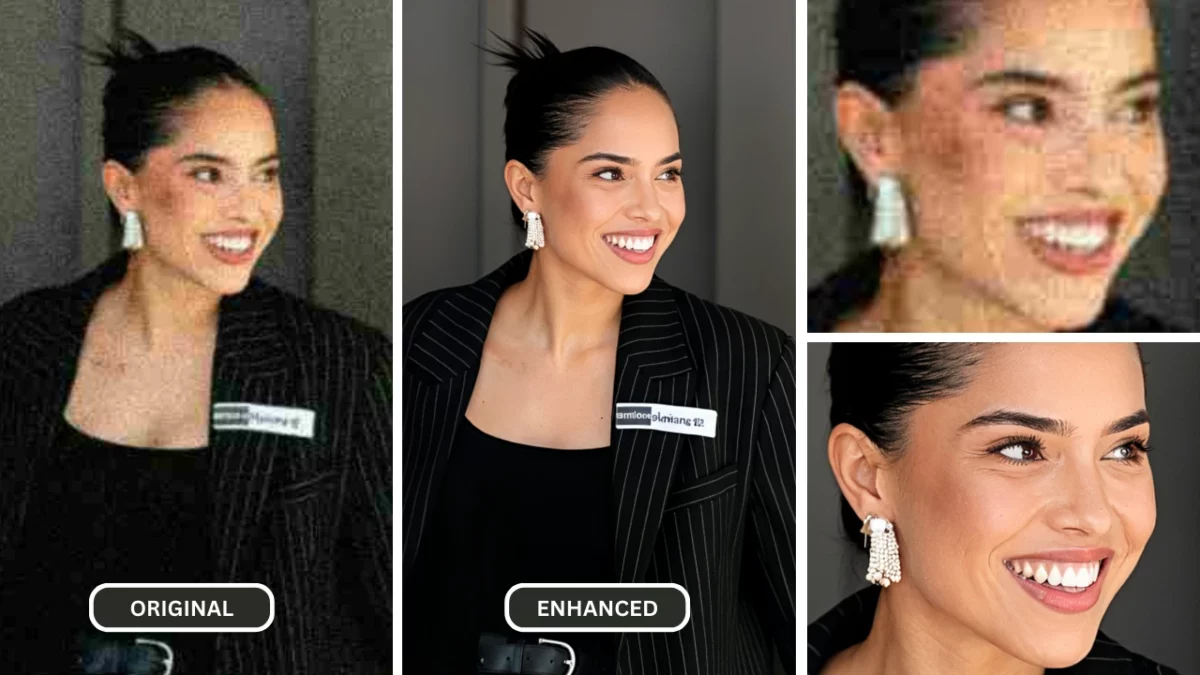
1. The Revolution in Image Enhancement with Image Unblurrer Technology
a. The Common Problem of Blurry Images
Blurry images are more than just an inconvenience—they can undermine the quality of a project, diminish the value of a brand, or fail to capture the emotion of a moment. For businesses, blurry visuals can deter potential customers, while for individuals, they can ruin irreplaceable memories. As cameras improve, the expectation for flawless image quality rises, leaving little room for imperfection. Thankfully, advancements in technology are changing the game, and one standout solution is the image unblurrer powered by AI.
b. Why Image Quality Matters in Today's Digital World
High-quality visuals support clear communication across personal, creative, and commercial projects. Sharper source material can make products, people, and important visual details easier to inspect.
An AI image unblurrer can reduce the appearance of some blur and improve perceived clarity, but it cannot verify or recover every detail that is absent from the source. Results should be reviewed against the original before the image is published or used for a consequential decision.
2. Understanding Image Unblurring Technology
In the world of digital imaging, blurred pictures are a common frustration. Whether caused by shaky hands, poor focus, or fast-moving subjects, blurred images often obscure important details. Thanks to advancements in image unblurrer technology, it’s now possible to restore clarity to many of these imperfect shots. Let’s dive into what causes image blur, how modern techniques tackle it, and the role of cutting-edge solutions like PiktID Enhance in transforming image enhancement.
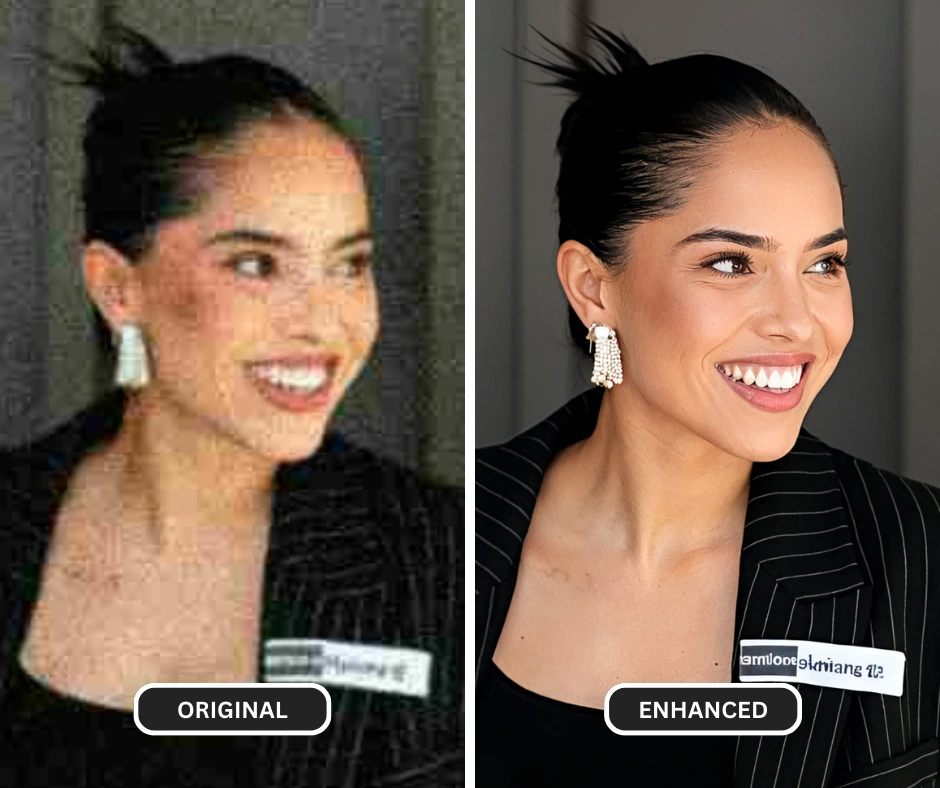
a. What Causes Image Blur?
Blurred images are usually the result of:
- Motion blur: Occurs when the subject or camera moves while the picture is being taken.
- Out-of-focus blur: Happens when the lens fails to focus properly on the subject.
- Optical aberrations: Result from imperfections in a camera lens that distort the image.
- Low resolution: When images are stretched or zoomed beyond their natural clarity.
Understanding the source of blur is crucial for designing technologies that can reverse its effects effectively.
Additional Resource : Blur Remover – PiktID Enhance
b. Traditional vs. AI-Powered Unblurring
Traditional unblurring methods relied on algorithms that sharpen images by enhancing contrast at edges or applying deconvolution techniques to estimate and reverse the blur. While effective to some degree, these methods often introduced noise or artifacts that reduced overall quality.
AI-powered image unblurrer solutions, on the other hand, leverage machine learning models trained on vast datasets of blurred and sharp images. These models identify patterns in the blur and predict what the original sharp image should look like. AI can recover details that traditional methods simply cannot, making it a game-changer in this field.
c. How PiktID Enhance Works
PiktID Enhance uses AI-assisted processing to improve visible edges, textures, and overall clarity. A practical image-unblurring workflow includes:
- Inspecting the source: Check whether the blur comes from motion, missed focus, compression, or low resolution.
- Processing the image: The model generates detail based on patterns in the source image.
- Previewing the result: Compare faces, text, edges, and repeating textures with the original.
- Choosing the output: Download the enhanced version only when it is suitable for the intended use.
d. The Science Behind Image Enhancement
AI image enhancement models analyze edges, textures, contrast, and other visual patterns to generate a sharper-looking result. This differs from conventional sharpening, which primarily increases local contrast around existing edges.
Because generated detail is an estimate rather than recovered ground truth, inspect the result at 100% zoom and compare it with the source. This is especially important around faces, text, fine product details, and repeated patterns.
Read more on Image Unblurring
3. Meet PiktID Enhance: Your AI Image Unblurrer
PiktID Enhance provides an AI-assisted image unblurrer and photo unblurrer workflow for personal photos, creative assets, and professional visuals. Upload an image, process it, compare the preview with the original, and download the result when the important details remain natural.
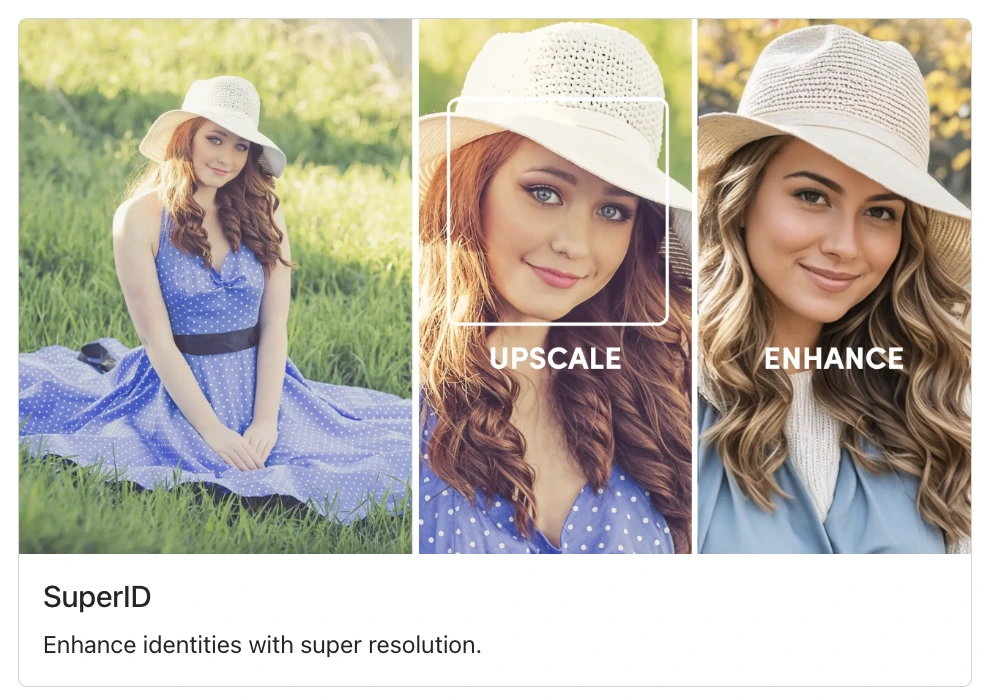
a. How It Leverages AI for Professional-Quality Images
PiktID Enhance analyzes the uploaded image and generates a clearer-looking version by improving visible edges, textures, and contrast. The result depends on the source: mild focus issues or compression may respond differently from severe motion blur or missing detail.
b. Key Features
- AI-assisted enhancement
Processes the source to improve perceived sharpness and visible detail. - Preview-based review
Lets you compare the enhanced output with the original before downloading. - Simple workflow
Upload a photo, run the enhancement, inspect the preview, and download the selected result.
Read more on Unblur Image AI
c. AI Enhancement vs. Traditional Sharpening
Traditional sharpening increases contrast around existing edges and can make noise or halos more visible. AI-assisted enhancement can generate a different interpretation of edges and textures, which may look more natural on some sources.
No image unblurrer can reconstruct a guaranteed original. Compare the preview with the source, especially around identity details, text, logos, and fine patterns, and keep the original file for reference.
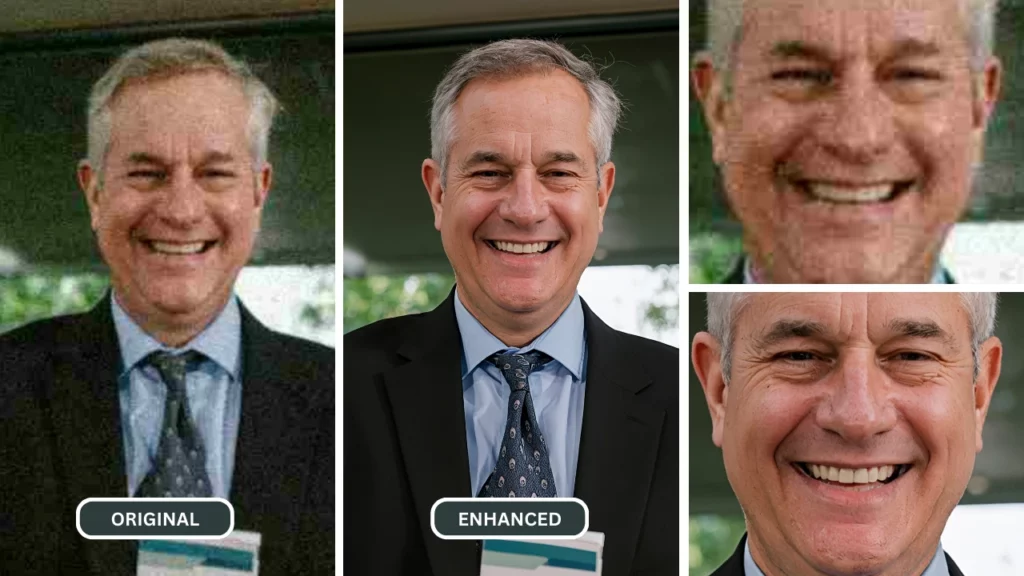
4. How to Use PiktID Enhance as an Image Unblurrer
PiktID Enhance offers a direct way to test an image unblurrer on a blurry picture. The workflow below keeps the original available for comparison and makes review part of the process.
a. Step-by-Step Guide
- Upload your blurry photo
Open PiktID Enhance and choose the image you want to improve. Start with the highest-quality original available. - Start the enhancement
Choose the available enhancement option and begin processing. Processing time varies with image dimensions, source complexity, and current service load. - Preview the enhanced image
Compare it with the original at 100% zoom. Check faces, text, edges, hair, and repeating patterns for generated details or artifacts. - Download the selected result
If the preview is suitable for its intended use, download the enhanced version and retain the original for reference.
b. What to Check When Unblurring an Image
- Accessible workflow: Upload, process, preview, and download without manual sharpening controls.
- Source-aware results: Output varies with blur severity, compression, lighting, and the detail present in the original.
- Review before use: Compare important details with the source rather than assuming generated detail is accurate.
Read more about the Unblur Tool workflow.
5. Using PiktID Enhance as an Image Unblurrer
Ease of use: PiktID Enhance provides an upload, process, preview, and download workflow for users who do not want to configure manual sharpening filters.
Current plans: Credit use, output options, and plan terms can change. Review the current Studio interface and pricing information before processing a large batch.
Appropriate inputs: Test personal photos, product images, creative assets, and older scans individually. Mild blur and compression may respond better than severe motion blur or missing detail.
Review: AI enhancement can generate plausible detail. Keep the original and verify faces, text, logos, and other important features before publishing.
6. Real-Life Applications of an Image Unblurrer
An image unblurrer is a powerful tool with diverse applications across personal, professional, and creative fields. Its ability to restore clarity and detail to blurry images makes it an essential asset in today’s visually driven world. Below are some expanded use cases:
a. Fixing Personal Photos
Capture life’s most cherished moments with enhanced clarity. Whether it’s a family vacation, a candid moment with loved ones, or snapshots from a special event, an image unblurrer ensures that your memories are preserved in the best quality possible. No more worrying about shaky hands or imperfect focus.
b. Enhancing Professional Visuals
In professional settings, visuals play a pivotal role in communication. Blurry images can undermine the impact of marketing materials, business presentations, or product displays. An image unblurrer helps businesses sharpen these visuals, ensuring they convey professionalism and leave a lasting impression on the audience.
c. Improving Social Media Content
Content creators and brands can use an image unblurrer to prepare a clearer-looking source for crops and platform-specific layouts. Enhancement alone does not determine reach or engagement; the subject, creative, audience, caption, and distribution also matter.
d. Restoring Old, Blurry Photographs
Many people treasure old photographs as a connection to the past, but age and storage conditions can often lead to deterioration. An image unblurrer can restore these cherished images by recovering lost details, enabling families and historians to preserve memories and legacies for generations.
e. Reviewing Reference and Research Images
For diagrams, reference images, and non-diagnostic research visuals, enhancement can make some edges easier to inspect. AI-generated detail must not be treated as measured or verified evidence, and this consumer photo workflow is not a substitute for validated scientific or medical imaging systems.
f. Reviewing Documentary and Surveillance Images
AI enhancement may make surveillance or documentary images easier to view, but it can also generate details that were not present in the source. Do not treat an enhanced output as verified evidence; retain the original and follow the review and chain-of-custody requirements that apply to the use case.
g. Educational and Creative Projects
Teachers, students, and artists often rely on visuals for projects and presentations. An image unblurrer can improve the quality of illustrations, diagrams, or artistic works, making them more impactful and visually appealing.
By leveraging the capabilities of an image unblurrer, individuals and organizations can unlock the full potential of their visual content, ensuring clarity, professionalism, and emotional resonance in every application.
Feel free to learn more about PiktID Enhance as your Deblur Image Tool
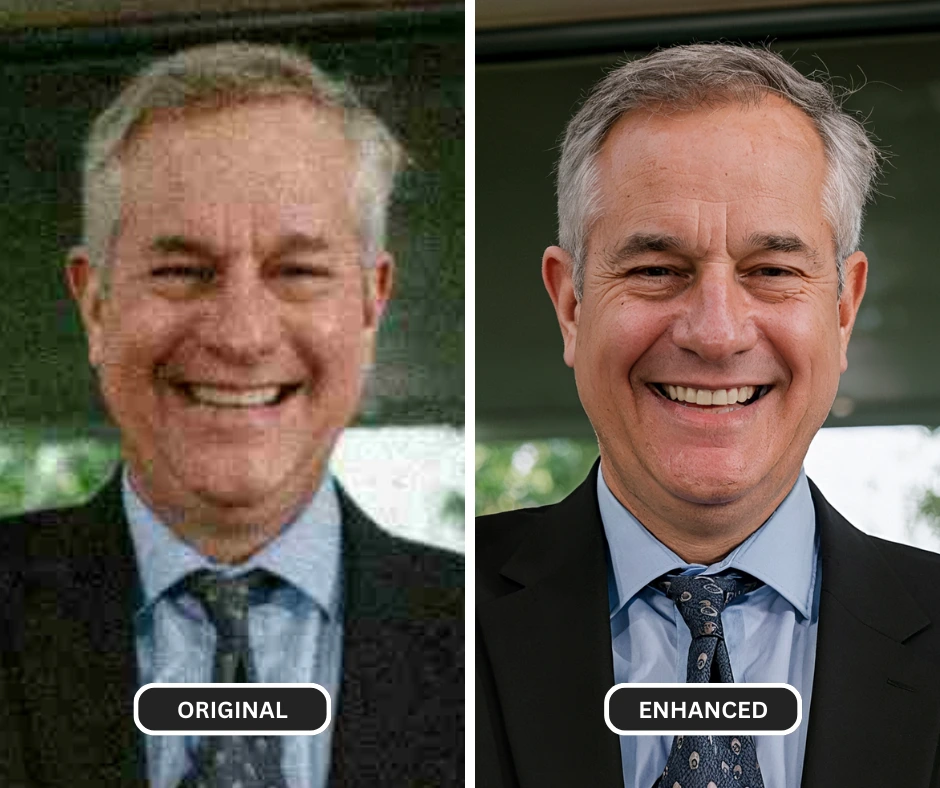
7. Frequently Asked Questions About Image Unblurrers
a. How do I clear a blurred image?
Use an image unblurrer by uploading the highest-quality source available, processing it, and comparing the preview with the original. PiktID Enhance can improve perceived sharpness and detail, but the result is generated and should be checked for artifacts or changed features before download.
b. Can an image unblurrer fix all types of blurry photos?
No. Results depend on the type and severity of blur, compression, resolution, and the detail available in the source. Mild blur may improve, while severe motion blur, heavy compression, or missing detail can produce limited results or generated artifacts.
c. How long does image unblurring take?
Processing time varies with image dimensions, source complexity, internet connection, and current service load. Keep the page open until processing finishes, then inspect the preview before downloading.
d. What should I check before uploading a photo?
Before uploading an image, review the current PiktID privacy policy and terms for the processing and account conditions that apply. Avoid uploading material you do not have permission to process.
e. How do I check current credits and plans?
Available credits, trial access, and plan features can change. Check the current Studio interface and pricing page for the terms that apply to your account.
f. Does unblurring a photo reduce its quality?
It can. An image unblurrer may improve perceived sharpness, but processing can also introduce halos, smooth textures, or generate details that differ from the source. Compare the preview at 100% zoom and keep the original file.
g. How is PiktID Enhance different from traditional editing software?
Traditional editing software offers manual control over sharpening, deconvolution, noise reduction, and masking. PiktID Enhance automates an AI-assisted workflow, which is simpler to test but provides a generated interpretation of missing or blurred detail.
Choose the method based on the source and intended use, and compare the output with the original before publishing.
Conclusion: Test the Image Unblurrer Against the Original
An image unblurrer can help improve the perceived clarity of personal photos, creative work, presentations, and product visuals. PiktID Enhance provides a simple workflow for testing an image and reviewing the output.
Results vary with the source, and generated detail may differ from the original. Compare important details at 100% zoom and keep the source file.