
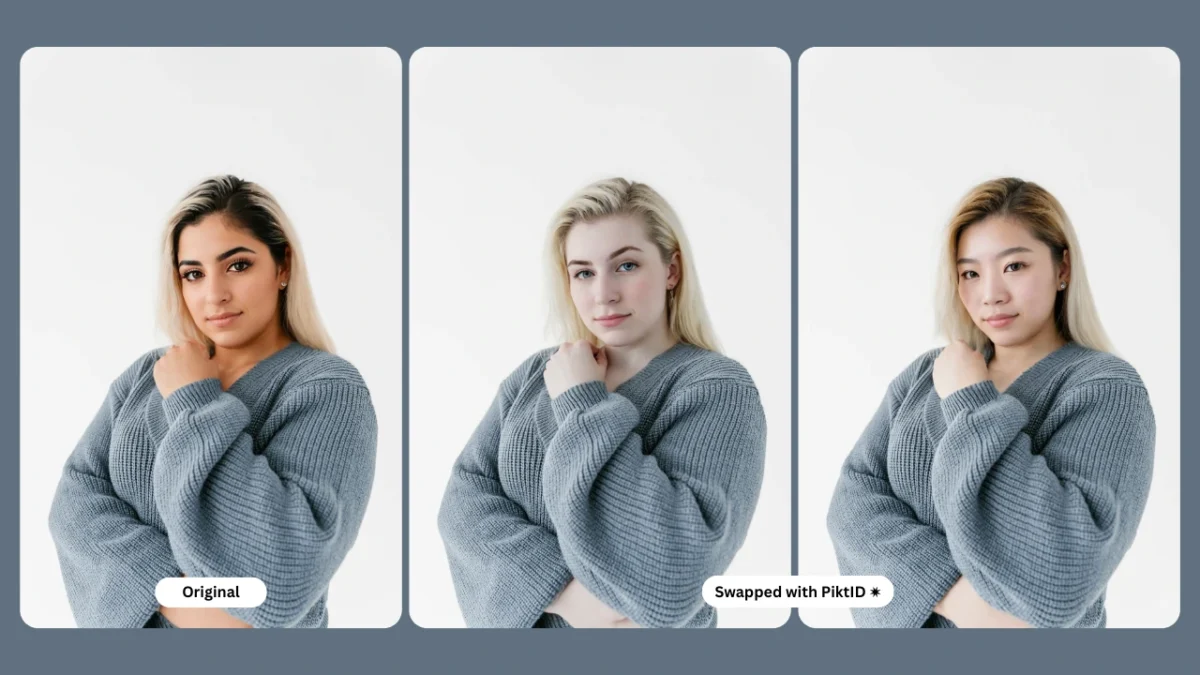
I. Executive Summary
Modern fashion brands increasingly require visual consistency, rapid content production, and scalable model imagery across collections. Traditional photo shoots depend heavily on model availability, casting budgets, location preparation, and licensing restrictions, all of which create friction in fast moving Ecommerce environments. Body swap through AI offers an alternative: brands can photograph a single fit model for all outfits and later replace that individual with a brand approved identity that remains consistent across seasons, styles, and product lines.
This approach allows creative teams to maintain a unified brand look without coordinating multiple models or rescheduling shoots. PiktID’s AI system ensures accurate pose alignment, lighting consistency, fabric drape realism, and skin texture mapping, while preserving the identity chosen by the brand. These technical elements ensure the final output looks natural, high quality, and suitable for both editorial and Ecommerce usage.
This guide explains how body swap works, the production challenges it solves, and how fashion brands can integrate it into existing work flows. It also outlines how to access PiktID’s early body swap features designed for professional studios, fashion houses, and high volume marketplace sellers.
To get early access to PiktID Body Swap, email office@piktid.com and the team will enable your account.
II. Why Body Swap Matters in the Fashion Industry

Fashion brands face increasing pressures around content creation cost, speed, and consistency. Key industry challenges include:
- Rising costs of professional models, hair and makeup teams, studio preparation, and licensing renewals.
- Accelerating production cycles for Ecommerce, where new arrivals must go live daily across multiple platforms.
- Difficulty maintaining a consistent visual identity across shoots when using different models or multiple studios.
- Limitations in reusing the same model across categories or seasons due to scheduling, budget, or geographical barriers.
Body swap technology directly addresses these problems in ways that traditional work flows cannot:
- A single fit model can shoot all products, and AI replaces that model with a brand approved identity, ensuring uniform presentation across look books, catalogues, and product pages.
- Decentralized studios can maintain global visual consistency, even when production is split across countries or teams.
- Retouching and post production workloads decrease significantly because the identity is applied consistently and cleanly across images.
- Brands with large SKU volumes can scale content creation without adding more production days or expanding casting budgets.
Examples of where this becomes especially valuable include:
- DTC brands launching 500 or more SKUs each month and needing uniform visuals.
- Marketplace sellers across Amazon, Etsy, and Shopify who must produce images at speed to stay competitive.
- Luxury and premium brands that rely on a stable model identity to reinforce their visual narrative across campaigns.
Body swap provides a practical, economically efficient way to standardize model imagery while maintaining creative flexibility and high visual quality.
III. How AI Body Swap Works

AI-driven body swap technology relies on multiple interconnected components that work together to create a realistic, seamless transformation. The process begins with pose alignment, where the system analyzes the subject’s orientation, limb positioning, and garment movement. This helps the AI understand how fabric falls, how shadows behave, and how the human form interacts with the clothing. Once the pose is mapped, identity replacement takes place. In PiktID, this process resembles the precision achieved by Swap, where facial and upper body identity features are blended into the base model while preserving overall posture and garment structure.
Another key component is skin-tone mapping. This step ensures that transitions at the neckline, shoulders, and arms look natural rather than patched or mismatched. The AI automatically adjusts tone variations, undertones, and soft gradient blending to maintain visual cohesion. Lighting and shadow matching further enhances realism by embedding the new identity into the original studio environment. The AI evaluates directional light, falloff, highlight placement, and reflected light to harmonize the final look.
Texture preservation ensures that fabric details such as seams, pattern density, wrinkles, pleats, and stitching remain unchanged. This is essential in fashion workflows where garment accuracy cannot be compromised. When combined, these components create a complete pipeline capable of delivering production grade visual output.
Relevant PiktID tools that support this pipeline include:
- SwapID for identity transformation
- Body swap module (upcoming)
- Change Expressions for fine tuning face alignment
- Upscale for final retail ready output
- Edit Background for clean studio or brand specific scenes
Together, these modules allow fashion teams, Ecommerce studios, and marketing departments to produce consistent model imagery at scale.
IV. Step-by-Step Guide: How to Do a Body Swap with PiktID

- Upload Fit-Model Photo
Use a neutral pose under standard lighting, ideally front or three quarter view. This ensures accurate posture detection and garment flow mapping. - Upload the Target Model Identity
This can be:
- An AI-generated model created through Generate Person
- An anonymized synthetic identity
- A licensed celebrity inspired identity
- A returning model reused from previous campaigns
- AI Maps Pose and Body Structure
The system detects shoulders, spine alignment, silhouette, garment tension areas, and overall body proportions. - AI Applies Identity and Proportion Correction
This step adjusts height, torso length, neckline position, and other proportional markers to match the target identity while retaining garment accuracy. - Lighting and Shadow Correction
The AI blends the new identity into the original set by matching studio lighting, shadow angles, ambient reflections, and background saturation. - Export for E-commerce or Campaign
Use Upscale for 4K or high resolution export to ensure the image meets retail, catalog, or marketing standards.
V. Step-by-Step Guide: API Workflow
High-volume fashion and Ecommerce brands often require a fully automated workflow that can process thousands of images, maintain identity consistency, and minimize manual intervention.
The PiktID API enables large-scale production through structured parameters and asynchronous job handling. This workflow is designed for teams managing 2,000+ SKUs per month, virtual look books, or body swap use cases where fit models must be replaced with preferred brand identities.

Key API Parameters
When calling the Swap endpoint, ensure the following parameters are included:
- source_image
The original product or model photograph. This image provides the body pose, garment fit, lighting environment, and backdrop. - target_identity
The stored synthetic identity or fit model reference you want applied to the final output. Ideal for brands maintaining identity consistency across multiple product drops. - pose_alignment=true
Enables intelligent matching between target identity facial angles and the source model’s body posture. Useful in scenarios where the target image has a different head tilt or profile. - skin_blend=auto
Automatically matches skin tone, undertone, and texture for a seamless transition between the target identity and source model. This reduces retouching work. - lighting_match=high
Ensures the target face adopts the same light direction, shadows, and highlights as the original photograph. Reduces inconsistencies commonly seen in manual body swap attempts. - garment_preserve=ultra
Protects fabric structure, stitching detail, embroidery patterns, shine level, and texture. Essential for accurate representation of material quality on Ecommerce listings.
Batch Processing at Scale
This workflow allows teams to process large product catalogs with minimal manual setup.
- Automated batching for 2,000+ SKUs per month
Submit entire collections in batches, where each job contains multiple product photos and a consistent target identity. - Asynchronous job IDs
API calls return a job_id for every request. These jobs continue processing in the background so your pipeline can move forward without waiting for completion. - CDN output URLs
Once the job finishes, high resolution results are delivered via CDN links, allowing instant integration into CMS systems, product pages, DAM tools, or cloud storage.
This system ensures predictable output quality, faster production cycles, and uniform brand identity across campaigns or catalog releases.
VI. Best Practices & Troubleshooting
To maintain professional grade output, teams should follow these guidelines during shooting and preprocessing phases.

To Get the Best Results
- Use a “fit model” wearing neutral makeup
Neutral makeup helps the AI blend features naturally with the target identity, avoiding unwanted color shifts or mismatched tones. - Avoid extreme arm extensions
Natural, relaxed poses ensure stable results and reduce risks of limb distortion in large clothing categories, especially outerwear. - Shoot with one consistent light direction
A single key light setup helps maintain lighting continuity and reduces mismatch issues between source and target identities. - Keep hair tied or simple
Complex hairstyles may interfere with facial boundaries during identity transfer. Simple hair setups reduce retouching. - Use branded backdrops
Clean, branded backgrounds support consistent catalog aesthetics and reduce post processing adjustments.
Troubleshooting Common Issues
- Patchy neck area
Cause: Inconsistent lighting or tonal mismatch.
Fix: Improve frontal lighting or increase the skin_blend parameter to reinforce tonal consistency. - Identity mismatch
Cause: Target model reference is low resolution or poorly lit.
Fix: Re-upload the target_identity at a higher resolution with even lighting. - Fabric distortion
Cause: Low garment preservation settings or extreme angles.
Fix: Set garment_preserve to ultra to maintain fabric integrity, stitching, and drape.
If you want, I can also expand the remaining sections of the blog, create a comparison table, or write the entire final draft following your PiktID structure.
VII. Use Cases & Real Fashion Brand Examples

This section highlights how different segments in the fashion ecosystem leverage AI-driven visual consistency to reduce production time, lower photo shoot costs, and accelerate catalog creation. The technology is particularly valuable for brands that need scalable identity alignment, flexible merchandising workflows, and the ability to reuse the same model across multiple products or campaigns.
In many cases, full body swap work flows streamline content creation by keeping proportions, poses, lighting, and fabric behavior intact, enabling brands to maintain a cohesive look without repeated photo shoots.
1. Global Retailers
International retailers rely on strict visual guidelines that must be applied at scale across multiple countries.
Using a standardized identity helps them:
- Maintain catalog uniformity regardless of regional studios or production teams.
- Deploy centralized model templates to ensure brand consistency in every market.
- Handle rapid product updates without coordinating multi location shoots.
2. Marketplace Sellers
Marketplace brands often manage hundreds of SKUs that require uniform styling for better conversion and buyer trust.
Key benefits include:
- Replacing the model across 300+ product images to maintain a unified storefront identity.
- Eliminating inconsistent lighting and mismatched poses that occur when using outsourced product photography.
- Using a single model identity to build stronger brand recall and reduce catalog churn.
3. Boutique Labels
Boutique designers aim for a premium, editorial look but may not have the budget to hire the same model each season.
This workflow allows them to:
- Create a signature model identity that remains consistent across look books.
- Reuse that identity across new product drops, campaigns, and seasonal collections.
- Test different poses, aesthetics, and outfit compositions without scheduling new photo shoots.
4. Influencer Apparel Brands
Influencer led brands often want the founder’s presence in every product image for stronger personal branding.
This can be achieved with:
- Applying the creator’s identity across all product visuals using body swap techniques.
- Building trust by showing the influencer wearing every outfit in the catalog.
- Producing large volumes of campaign content even when the influencer is unavailable.
5. Footwear and Accessories
Accessories and footwear require precise proportion matching to avoid distorted visuals.
AI-driven workflows make it possible to:
- Align body and leg proportions to specific product categories such as sporty, luxury, or streetwear.
- Maintain consistent angles, posture, and studio lighting across all items.
- Produce clean, editorial quality visuals that highlight the product without re-shooting models.
VIII. PiktID vs Competitors

This comparison outlines how PiktID’s fashion focused pipeline differs from general purpose editing tools. While most platforms can perform basic face edits, very few support full figure transformation, consistent identity reuse, or the fabrication of realistic AI models that align with commercial fashion standards.
| Feature | PiktID | Canva | Fotor | Reface | DeepSwap |
| Full body swap for fashion | ✔ | ✖ | ✖ | ✖ | ✖ |
| Pose alignment | ✔ | ✖ | ✖ | ✔ (face only) | ✔ (face only) |
| Fabric texture preservation | ✔ | ✖ | ✖ | ✖ | ✖ |
| Identity storage for lookbooks | ✔ | ✖ | ✖ | ✖ | ✖ |
| Synthetic AI models | ✔ | ✖ | ✖ | ✖ | ✖ |
| Studio lighting matching | ✔ | Moderate | Low | Low | Low |
| Fashion-focused pipeline | ✔ | ✖ | ✖ | ✖ | ✖ |
This table demonstrates that PiktID is purpose built for fashion applications, offering advanced capabilities that ensure consistent identity, realistic garment behavior, and high quality editorial output across large scale catalogs.
IX. Ethics, Licensing & Privacy Notes

AI-driven visual workflows introduce new efficiencies for fashion, e-commerce, and marketing teams, but they must operate within clear ethical and legal boundaries. Using synthetic models generated through PiktID’s Anonymize tool helps brands avoid copyright limitations, licensing restrictions, and model-release obligations. Because these identities are synthetic, businesses can create a reusable model library without dealing with traditional talent agreements.
Brands that operate in GDPR-compliant regions can safely produce anonymized identities without storing sensitive personal data. This is particularly important for teams managing large-scale photoshoot archives or planning to integrate body swap workflows into their production pipeline.
The fit-model substitution process allows brands to reduce recurring costs related to hiring, casting, and reshoots, while still preserving realism and garment accuracy. However, responsible usage is essential. AI outputs should never mislead consumers, alter garment silhouette, or modify product fit in a way that affects purchase expectations. Teams should maintain transparency around how imagery is produced and ensure that clothing dimensions, drape, and material behavior remain unchanged.
When deploying body swap or synthetic model workflows, brands should consider the following best practices:
- Ensure product integrity: The garment must look the same before and after the transformation.
- Avoid altering body measurements: Do not digitally manipulate the figure in ways that change fit perception.
- Maintain natural shadows and lighting to avoid misleading imagery.
- Retain metadata and internal documentation for compliance or audit purposes.
- Disclose usage of AI-generated models when required by regional consumer-protection laws.
X. Making the right decision with PiktID

AI-driven body swapping is reshaping how fashion brands create and scale visual assets. It eliminates costly casting cycles, simplifies styling and makeup requirements, and ensures consistent identity across hundreds of product SKUs. The workflow supports fast-fashion brands, digital marketplaces, luxury labels, and influencer-led businesses that need reliable and repeatable imagery.
By replacing traditional models with synthetic or AI-generated alternatives, teams can streamline production while maintaining accurate garment representation and high visual quality.
Want early access to PiktID’s AI Body Swap for fashion?
Email us at office@piktid.com.
XI. FAQs

1. What is a body swap in photos?
A body swap replaces the body or pose in an image while keeping the face or identity consistent, often used for fashion and e-commerce product visualization.
2. How does AI body swap work for the fashion industry?
AI maps facial identity onto a new pose or model while preserving garment shape, lighting, and material behavior for realistic product representation.
3. Can I replace a fit model with an AI-generated model?
Yes, as long as garment proportions stay accurate and you use synthetic or licensed identities.
4. Is body swapping legal for commercial use?
It is legal when you have rights to the original assets or use synthetic models that avoid model-release requirements.
5. How do I maintain garment realism during a body swap?
Use high-resolution source images, consistent lighting, and ensure the clothing silhouette remains untouched.
6. Can lighting or shadows break the illusion?
Yes, mismatched shadows, highlights, or color tones can make the final image look artificial; consistent lighting is essential.
7. Does body swap affect fabric drape or product integrity?
If done properly, no. The clothing should remain unchanged; only the model or pose is substituted.
8. What type of images work best for AI body swaps?
Images with clear lighting, front-facing angles, defined garment edges, and minimal motion blur yield the best results.
9. Can I body swap at scale for e-commerce?
Yes, AI workflows allow batch processing to produce hundreds of consistent product visuals.
10. How do I get early access to PiktID’s body swap tool?
You can request early access via email and receive onboarding details before the public release.