
Estimated reading time: 18 minutes
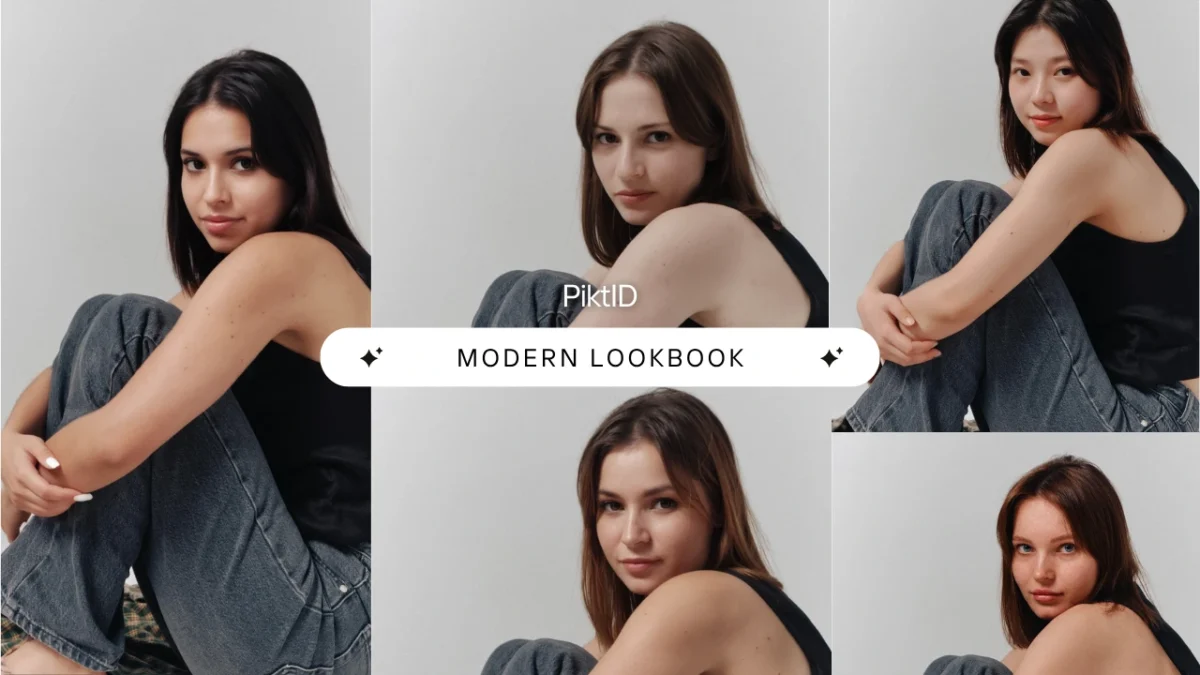
AI model Swap refers to the use of artificial intelligence to replace or modify a model’s identity in an existing image while preserving the original pose, lighting, clothing, and scene context. Instead of organizing new photoshoots, brands can digitally adjust model identities in seconds.
This shift is being driven by practical business needs:
- Rising photoshoot production costs
- Faster campaign timelines
- Demand for localized visuals across regions
- Need for consistent brand identity across catalogs
AI model Swap enables brands to reuse high-performing campaign images while updating model identities to match new demographics, markets, or seasonal messaging.
The biggest advantage is operational efficiency. There are:
- No reshoots required
- No studio re-bookings
- No logistics delays
- Faster creative turnaround
On-model supports this workflow by:
- Preserving original pose and lighting direction
- Maintaining fabric texture and garment integrity
- Handling hairlines, skin tones, and facial structure naturally
- Producing catalog-ready, high-resolution outputs
1. What Is AI Model Swap?
A) Core Definition
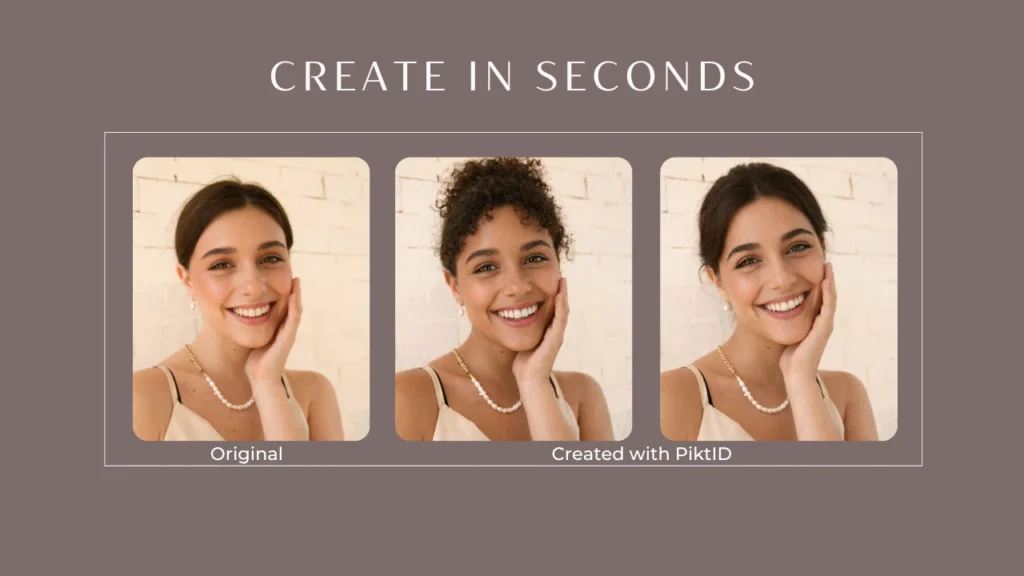
AI model Swap is a professional-grade technology that replaces a model’s face or full identity within an existing image while keeping the surrounding elements intact.
The AI analyzes:
- Lighting direction
- Facial structure
- Skin tone and texture
- Head angle and expression
- Background depth and shadows
The result is a new model identity blended into the original scene without disrupting:
- Clothing fit
- Garment folds
- Fabric details
- Camera perspective
This is not the same as casual face swap apps used for entertainment.
AI model Swap differs from:
1) Simple Face Swap Tools
- Often used for social media fun
- Limited realism
- Poor lighting matching
- Not suitable for professional campaigns
2) Generic Generative AI Images
- Creates entirely new images from scratch
- May not match brand consistency
- Harder to replicate specific poses or product positioning
3) Basic Image Editing
- Manual retouching is slow and inconsistent
- Requires high skill and time investment
AI model Swap focuses on high-fidelity commercial use. It is designed for brands, not selfies.
B) What makes AI Model Swap useful?
Brands and creatives are looking for scalable solutions. The most common motivations include:
1) E-Commerce Consistency
Online stores often need hundreds or thousands of product images featuring models. AI model Swap allows brands to:
- Maintain consistent pose across SKUs
- Change model identity without re-shooting
- Adapt visuals for different markets
2) Fashion Lookbooks
Lookbooks require diversity and variation. On-model enables:
- Multiple model representations using the same outfit
- Regional customization for global markets
- Fast seasonal updates
3) Catalog Production at Scale
Large retailers frequently update product catalogs. Instead of repeating expensive shoots, On-model helps:
- Refresh existing imagery
- Adjust demographic representation
- Maintain brand aesthetic guidelines
4) Faster Campaign Turnarounds
Modern marketing cycles move quickly. On-model allows creative teams to:
- Test multiple model variations
- Run A/B campaigns
- Launch visuals without production bottlenecks
5) Budget Optimization
Production budgets are under pressure across the fashion industry. On-model reduces:
- Studio rental costs
- Model booking fees
- Travel and styling expenses
This is why On-model is increasingly discussed in industry reports and brand strategy conversations.
2. Why Fashion Brands Are Adopting AI Model Swap
Major brands have publicly confirmed experimenting with AI-generated models, digital twins, and image automation to reduce production time and scale campaigns faster.
AI model Swap sits at the center of this transition because it solves one of fashion’s biggest bottlenecks: visual production.
A) Cost and Time Efficiency
Traditional fashion photography is resource-heavy.
A single campaign typically requires:
- Booking photographers and studios
- Hiring models and stylists
- Managing hair, makeup, and wardrobe prep
- Coordinating logistics and schedules
- Editing and retouching large image batches
This process can take weeks and significant budget allocation.
AI model Swap changes the economics.
Instead of reshooting content:
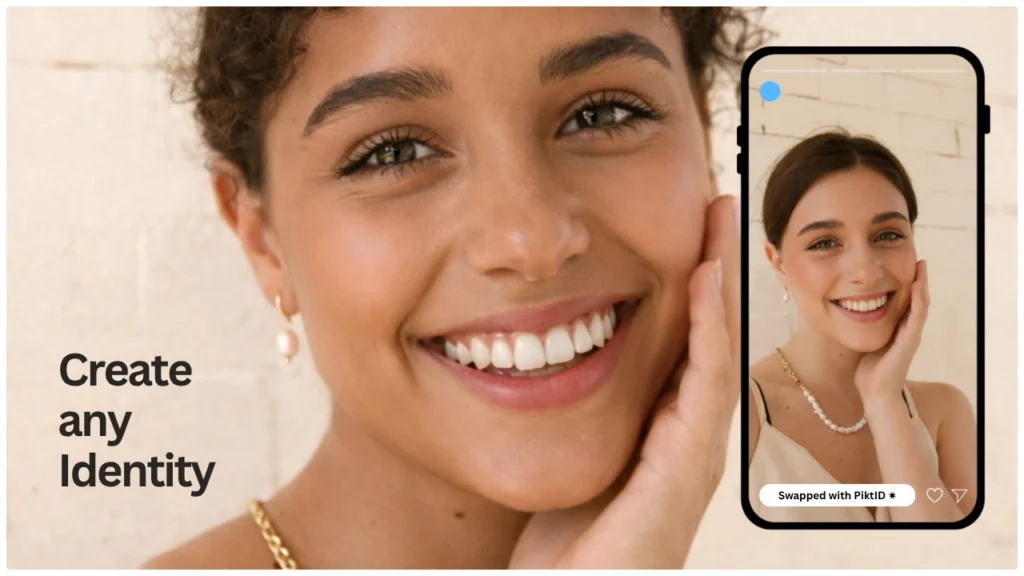
- Brands reuse existing outfit photos
- Swap model identities digitally
- Produce multiple variations from a single base image
- Reduce reshoot dependency
For e-commerce brands with hundreds or thousands of SKUs, AI model Swap reduces turnaround time dramatically. Campaign adjustments that once required rescheduling can now be completed within hours.
B) Consistency Across Catalogs
Maintaining visual consistency across large catalogs is difficult.
Common challenges include:
- Lighting variations between shoots
- Different model poses for similar products
- Inconsistent skin tones or styling
- Background mismatches
AI model Swap enables controlled uniformity.
Because the system analyzes lighting, pose, and structure before replacing identity, it can:
- Maintain consistent shadows and highlights
- Keep camera angle and posture intact
- Apply the same model identity across an entire collection
- Standardize product presentation
For marketplaces like Shopify, Amazon, and brand-owned e-commerce platforms, this visual consistency improves brand trust and perceived professionalism.
C) Personalization and Market Expansion
Global fashion brands serve diverse audiences.
Traditionally, localizing campaigns meant:
- Hiring different regional models
- Running separate photoshoots
- Managing multiple production teams
AI model Swap enables demographic localization without restarting production.
Brands can:
- Adapt model identities to match regional markets
- Create inclusive representation across campaigns
- Build localized lookbooks for different countries
- Test different model variations for engagement performance
This allows faster market entry and scalable personalization strategies.
D) Competitive Advantage
Speed matters in fashion.
Trends shift quickly, especially with social media influence. Brands that adapt faster win.
AI model Swap supports:
- Rapid campaign iteration
- A/B testing different visuals
- Immediate content refresh for seasonal launches
- Faster reaction to trending styles
Instead of waiting for a new shoot, marketing teams can update visuals immediately. In a competitive digital environment, that flexibility provides measurable advantage. Read more about Image Face Swap — How to Face Swap photos.
3. How AI Model Swap Works
Understanding how AI model Swap functions helps explain why it differs from basic face editing tools.

A) Core Mechanics
AI model Swap is not just overlaying one face on another. It involves multiple technical stages.
1. Input Image Analysis
The system first evaluates:
- Pose detection
- Facial landmarks
- Head angle
- Lighting direction
- Shadow intensity
- Image resolution
This ensures the base image structure is preserved.
2. Target Identity Synthesis
The system then:
- Selects or generates a new model identity
- Maps facial proportions
- Aligns expression and gaze
If synthetic identities are used, they are generated to match the brand’s demographic needs.
3. Identity Integration
Finally, AI integrates the identity into the image by:
- Matching skin tone and undertones
- Adjusting highlights and shadows
- Blending hairline and jaw contours
- Preserving clothing edges
- Maintaining fabric texture
This stage is critical. Poor integration is what makes many generic swaps look artificial.
B) What Makes Model-Grade AI Model Swap Different from a Simple Face Swap
There is a significant difference between entertainment-focused face swap apps and professional AI model Swap systems.
Model-grade swap systems focus on:
- Lighting direction adherence
- Accurate hairline blending
- Jawline structure matching
- Micro-expression alignment
- Texture preservation
- Consistency across multiple images
Simple face swap tools often:
- Ignore lighting sources
- Create mismatched shadows
- Distort posture alignment
- Over-smooth skin texture
Professional AI model Swap maintains the integrity of the original photograph. The goal is realism, not novelty.
C) Risks with Generic Face Swap Tools
Many tools labeled as AI-powered are built for casual or entertainment use.
Common issues include:
- Mismatched lighting that makes the face appear pasted
- Artificial skin texture artifacts
- Over-sharpened or plastic-like appearance
- Distorted facial proportions
- Loss of natural posture cues
- Visible blending lines around the hairline
These flaws reduce trust, especially in e-commerce and fashion campaigns where realism directly impacts conversion.
AI model Swap systems designed for fashion workflows prioritize photorealistic results and production reliability.
4. Introducing On-model: Feature Breakdown
Fashion brands exploring AI replacing models need tools that produce commercial-grade results — not novelty edits. This is where AI model Swap through On-model is positioned as a production-ready solution rather than a casual face-editing app.

A. What On-model Does
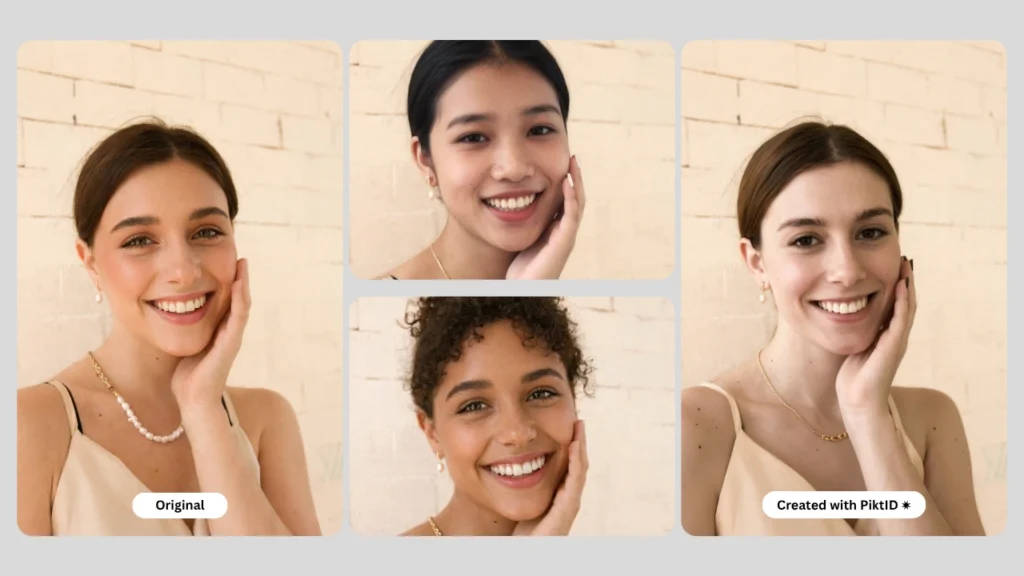
On-model enables AI model Swap by replacing a model’s identity in a photo while preserving the integrity of the original image.
Realistic model identity replacement
The system analyzes:
- Facial structure
- Head position
- Camera angle
- Skin tone
- Lighting direction
It then blends a new identity naturally into the base image without distorting body posture or garment presentation.
Pose-preserving swap
Unlike basic face-swapping apps, AI model Swap keeps:
- Original body position
- Shoulder alignment
- Hand placement
- Garment drape and structure
This is critical for fashion catalogs where clothing fit and silhouette must remain accurate.
Lighting and texture integrity
Professional campaigns depend on lighting consistency. AI model Swap maintains:
- Shadow direction
- Highlight intensity
- Skin texture realism
- Fabric light reflection
This avoids the “cut-and-paste” look seen in lower-quality tools.
Fabric edge preservation
In fashion imagery, details matter. The system preserves:
- Collar edges
- Neckline transitions
- Hair-to-fabric overlap
- Fine garment stitching details
This ensures product visuals remain trustworthy and conversion-ready.
Works across fashion use cases
AI model Swap is suited for:
- E-commerce product pages
- Lifestyle campaigns
- Social media ads
- Brand lookbooks
- Seasonal launches
It supports both studio and outdoor imagery.
B. Key Advantages of On-model
AI model Swap becomes valuable when it supports business workflows, not just image edits.
Catalog-ready quality
Outputs are designed to meet:
- E-commerce platform standards
- High-resolution marketing requirements
- Consistent brand presentation
High-resolution output
Files are export-ready for:
- Shopify and Amazon
- Social advertising
- Print campaigns
- Digital lookbooks
Clean edges and natural integration
Advanced blending prevents:
- Harsh face borders
- Skin tone mismatches
- Artificial smoothing
Rapid processing
AI model Swap processes images quickly, making it suitable for:
- Large SKU catalogs
- Seasonal refreshes
- A/B testing creatives
Integration with the On-model ecosystem
AI model Swap works best when paired with other tools:
- Upscale for sharpening and detail refinement
- Change Expression to adjust gaze direction or facial emotion
- Background Edit to adapt visuals for new campaign environments
- Generate Person to create new synthetic model identities
This integrated workflow supports full AI-powered visual production.
C. Product Positioning
AI model Swap is positioned as a production tool for serious fashion businesses.
i. For e-commerce
- Maintain consistent model identity across hundreds of SKUs
- Localize visuals for different regions
- Reduce dependency on repeated photoshoots
ii. For brand campaigns
- Test different faces for demographic targeting
- Create seasonal variations without rebooking studios
- Speed up creative iteration cycles
iii. For lookbooks and seasonal collections
- Keep a unified model presence
- Refresh identity while preserving garment styling
- Scale visuals quickly for digital launches
iv. For creative studios and agencies
- Deliver client revisions faster
- Offer scalable model options
- Reduce turnaround time on campaign assets
Additional Guide : Face Swap Technology – Transform photos like never before
5. Step-by-Step Guide: How to Do AI Model Swap with On-model
This section is structured for clarity and search intent. It explains both Studio and API workflows.
A. Studio Workflow
This workflow is ideal for creators, marketing teams, and smaller brands.
Step 1: Upload the Base Image
Choose a high-resolution image where:
- The model face is visible
- Lighting is clear
- Garment details are sharp
Higher-quality inputs produce better AI model Swap results.
Step 2: Choose the Target Identity
Options include:
- Uploading an existing model face
- Generating a new identity using Generate Person
- Using a previously stored synthetic identity
This allows consistency across campaigns.
Step 3: Select Swap Intensity and Quality
Adjust parameters depending on:
- How dramatic the identity change should be
- Whether the output is for social media or high-resolution marketing
Step 4: Adjust Lighting or Expression (Optional)
If needed:
- Use Change Expression to refine eye direction
- Match lighting tone for better integration
Step 5: Preview and Fine-Tune
Review:
- Hairline blending
- Neck transition
- Skin tone consistency
- Fabric overlap areas
Make adjustments before exporting.
Step 6: Download the Final Image
Export a high-resolution version ready for:
- E-commerce platforms
- Campaign creatives
- Lookbooks
B. API Workflow
For agencies and enterprise brands managing large product catalogs, AI model Swap can be automated.
1: Authentication
- Use API credentials provided by On-model
- Integrate securely within your backend system
2: Submit Batch Images
- Upload multiple product images
- Assign model identity references
- Define output resolution requirements
3: Receive Swapped Results Programmatically
- Results are returned via API endpoints
- Maintain structured naming for catalog workflows
- Automatically replace old assets with updated visuals
4: Integrate with E-Commerce Automation
Use AI model Swap within:
- Shopify pipelines
- DAM systems
- Creative automation tools
- Marketplace product feeds
This enables scalable visual production without manual editing. Here’s a complete guide about Face Swap Editor : The Best 3 Steps process to Swap
6. Best Practices for Beautiful Model Swap Results
Creating realistic results with AI model Swap depends heavily on the quality of your input and the alignment between source and target images. While modern AI tools are advanced, better inputs always produce better outputs.

A. Image Selection Tips
The foundation of a successful AI model Swap is image quality.
Use original, high-resolution images whenever possible. AI relies on visible facial detail to accurately map identity features such as:
- Eye shape and alignment
- Skin texture and tone
- Jawline contours
- Hairline precision
Avoid screenshots or images downloaded from social platforms. Compression artifacts from apps like Instagram or WhatsApp can reduce detail and make blending less accurate.
Ensure the face is large enough within the frame. If the face occupies only a small portion of the image, the AI has fewer pixels to work with, which can reduce realism.
For best results:
- Use images at least 1024px wide
- Avoid heavy filters before running AI model Swap
- Choose clear, front-facing or slightly angled portraits
B. Pose and Lighting Alignment
Lighting and camera angle are critical factors in achieving natural results with AI model Swap.
Matching camera angles improves structural consistency. If the base model is photographed from a 45-degree angle, use a reference face captured from a similar perspective. Extreme mismatches can cause subtle distortions in facial proportions.
Lighting consistency also matters. For example:
- Front-lit face swaps work best with other front-lit faces
- Side lighting should match direction and intensity
- Avoid mixing studio-lit images with harsh outdoor backlighting
Expression alignment enhances realism. If the base image shows a neutral expression, using a highly expressive or exaggerated reference face may create unnatural tension in the final result.
Small refinements such as adjusting gaze or expression after the AI model Swap can significantly improve the final output.
C. Avoiding Unrealistic Results
Even advanced AI systems perform best within logical visual boundaries.
Avoid extreme mismatches such as:
- Backlit base images paired with evenly lit reference faces
- Dramatically different skin tones under incompatible lighting
- Strong shadows combined with flat lighting
If edges appear slightly loose around hairlines or jawlines after AI model Swap, refine the image using AI enhancement tools like Upscale. This improves texture definition and tightens blending areas.
Remember:
- Subtle swaps look more realistic than dramatic changes
- Consistency creates believability
- Small adjustments often produce the best outcomes
7. Real Use Cases & Case Studies
AI model Swap is no longer experimental. Brands across fashion, beauty, and e-commerce are using AI-powered model workflows to accelerate campaigns and reduce production constraints.

A. E-commerce and Catalog Production
Online retailers often manage hundreds or thousands of product images.
With AI model Swap, brands can:
- Produce model diversity without reshooting entire catalogs
- Maintain consistent lighting and background across SKUs
- Adapt visuals to regional demographics
- Reduce dependency on repeat studio sessions
Instead of organizing new photoshoots for every campaign refresh, teams can reuse existing product images and update model identities efficiently.
This significantly reduces:
- Production time
- Talent scheduling logistics
- Studio rental costs
B. Lookbooks and Seasonal Campaigns
Seasonal campaigns require rapid creative turnaround.
AI model Swap enables brands to:
- Reuse the same setting and outfits
- Generate multiple campaign variations quickly
- Test diverse model looks for global markets
- Maintain visual cohesion across platforms
For example, a brand can shoot a single collection once and then create multiple campaign versions with different model identities while preserving brand aesthetics.
This supports faster go-to-market strategies and flexible marketing execution.
C. Influencer and Social Content
On social platforms, engagement performance can vary based on audience alignment.
Using AI model Swap, marketers can:
- A/B test different model identities in ads
- Adjust representation based on target demographics
- Localize visuals for different regions
- Optimize performance data-driven campaigns
Instead of guessing which creative performs best, brands can quickly generate visual variations and test them in real time.
D. Small Brands Without Photoshoot Budgets
AI model Swap creates a more level playing field for emerging brands.
Small businesses often face challenges such as:
- Limited access to professional studios
- Smaller marketing budgets
- Fewer resources for repeated shoots
With AI-powered workflows, smaller brands can:
- Build professional-quality campaigns
- Maintain consistent brand visuals
- Launch product imagery faster
- Compete visually with larger competitors
This democratizes access to high-quality fashion visuals and allows brands to focus more on product and storytelling rather than logistics. Users also refer to our Simple Guide on How to Change Face with AI!
8. Comparison: On-model vs Other AI Model Swap Tools
Comparison content ranks well because users searching for AI replacing models or AI model Swap tools want to know:
- Which tool produces realistic results?
- Which platform works for commercial campaigns?
- Which solution supports scale?
Most face swap tools on the market are built for entertainment. They are designed for selfies, memes, or short-form content. Fashion brands, however, require studio-grade output, consistent lighting, and catalog-ready visuals.
Below is a practical comparison focused on professional use.
Core Feature Comparison
| Feature | On-model | Generic Face Swap Tools | Competitor X | Competitor Y |
| True AI model Swap (full identity integration) | Yes | No | Partial | No |
| Lighting preservation | Yes | No | Partial | Partial |
| Fabric edge preservation | Yes | No | No | No |
| High-resolution output | Yes | No | Yes | No |
| API support for scale | Yes | Limited | Yes | No |
| Professional catalog readiness | Yes | No | Partial | No |
What “True AI Model Swap” Means
A true AI model Swap is not just pasting a face onto another body.
It involves:
- Matching facial structure to body angle
- Aligning lighting direction and shadows
- Preserving natural skin tone
- Maintaining jawline and hairline accuracy
- Protecting clothing edges and neckline details
Most generic tools:
- Distort hairlines
- Break lighting consistency
- Over-smooth skin
- Blur clothing details near the face
This makes them unsuitable for fashion campaigns or e-commerce listings.
9. Ethical & Practical Considerations
High-ranking articles discussing AI replacing models consistently address ethics and responsibility. Including this strengthens credibility and ranking potential.
A. Consent and Rights
When using AI model Swap with real individuals:
- Always obtain explicit consent.
- Respect image licensing agreements.
- Avoid using copyrighted images without authorization.
If privacy is a concern, synthetic identities are safer.
Using AI-generated models or synthetic faces eliminates:
- Unauthorized likeness risks
- Personality rights issues
- GDPR-related concerns in many regions
Responsible use protects both brands and individuals.
B. Avoid Misuse
AI model Swap should never be used for:
- Impersonation
- Fraud
- Deceptive advertising
- Political manipulation
- Harmful or misleading content
Brands should clearly define internal guidelines for responsible AI usage.
Transparency builds consumer trust.
C. Brand Authenticity Balance
The discussion around AI replacing models often centers on whether AI eliminates human creativity.
In practice, many brands use AI to enhance workflows, not replace creative teams.
Responsible adoption includes:
- Maintaining creative direction by humans
- Disclosing AI-generated content when necessary
- Preserving brand storytelling and emotional depth
- Combining human photography with AI model Swap enhancements
AI is a production tool. Creative vision remains human-led. Additional Guide about Face Swap AI: The Best Guide to Transform Images Easily
10. Conclusion
The shift toward AI model Swap is no longer experimental. Major fashion retailers and digital-first brands are already integrating AI into visual production pipelines to reduce costs and accelerate campaign timelines. Instead of organizing repeated photoshoots for every SKU, region, or season, brands are using AI model Swap workflows to generate consistent model imagery at scale.
Why AI model Swap is now essential for fashion brands
1. Saves money and time
Traditional fashion shoots involve:
- Studio rentals
- Model bookings
- Makeup and styling teams
- Post-production editing
- Location logistics
AI model Swap reduces these dependencies. Brands can reuse existing outfit images and apply new model identities digitally. This shortens campaign timelines from weeks to days.
2. Produces consistent visuals
Visual inconsistency affects brand perception. AI model Swap ensures:
- Uniform lighting direction
- Matching skin tones
- Stable facial proportions
- Reusable identities across campaigns
Consistency improves brand recognition and trust in e-commerce environments.
3. Improves marketing assets
AI model Swap allows brands to:
- Test different model demographics for A/B campaigns
- Localize visuals for different regions
- Generate seasonal variations without reshoots
- Create faster social media content cycles
High-quality model imagery directly impacts click-through rates and perceived product value.
4. Integrates easily into workflows
Modern AI tools like On-model integrate into creative pipelines without complex setup. Teams can:
- Upload an existing fashion image
- Apply AI model Swap
- Adjust lighting or expressions
- Export high-resolution files for web or print
For larger brands, API-based automation enables batch processing across full catalogs.
AI model Swap is not about eliminating creativity. It enhances production efficiency while maintaining professional standards. For brands competing in fast-moving digital markets, it is becoming a practical necessity rather than a futuristic option.
Ready to do realistic AI model Swap for your fashion visuals?
Try On-model with 10 free credits.
Visit https://on-model.com/ to get started today.
12) FAQs
1. What is an AI model Swap?
AI model Swap is a process that replaces a person’s face or identity in a fashion image using artificial intelligence. It keeps the original pose, clothing, and background while introducing a new model identity that blends naturally with lighting and texture.
This technology is widely used in fashion marketing and e-commerce to create scalable model imagery.
2. How can I do AI model Swap for fashion photos?
You can perform AI model Swap online using tools like On-model. The basic workflow includes:
- Uploading your base fashion image
- Uploading or generating a reference model face
- Applying the AI model Swap
- Reviewing lighting, tone, and facial alignment
- Downloading the final high-resolution image
The process typically takes seconds rather than hours of manual editing.
3. Is AI model Swap better than traditional reshoots?
AI model Swap can be more efficient than reshoots in certain scenarios. It is particularly beneficial when:
- You need multiple model variations for the same outfit
- You want to localize campaigns for different markets
- Budget or timing limits prevent additional shoots
However, AI complements traditional photography rather than fully replacing it in all cases.
4. How does On-model produce realistic model results?
On-model analyzes:
- Facial geometry
- Lighting direction
- Skin tone gradients
- Hairline boundaries
- Fabric edges near the neckline
By aligning these elements, AI model Swap outputs look natural and studio-ready rather than artificially pasted.
5. Can AI model Swap preserve lighting and fabric textures?
Yes, advanced AI model Swap systems are designed to maintain environmental consistency. Good results depend on:
- Using high-quality base images
- Matching camera angles
- Ensuring similar lighting conditions
The AI keeps clothing details, shadows, and folds intact while replacing only the model identity.
6. Can I use AI model Swap for e-commerce catalogs?
Yes. AI model Swap is particularly effective for large product catalogs where consistency is important. Brands use it to:
- Standardize model presentation
- Reduce visual inconsistencies
- Generate region-specific variations
- Speed up SKU-level content production
High-resolution output ensures images remain suitable for marketplaces and product listings.
7. How do I fix lighting mismatches after a model swap?
Lighting mismatches usually happen when the reference face and base image differ in brightness or direction. To improve results:
- Use similar lighting in both images
- Avoid extreme shadows
- Use AI enhancement tools to refine tone
In On-model’s ecosystem, additional adjustments can improve final realism.
8. Does AI model Swap work with full body images?
Yes. AI model Swap works on both close-up portraits and full-body fashion images. Full-body swaps require:
- Clear facial visibility
- Adequate image resolution
- Proper head alignment
When these conditions are met, AI can maintain proportional consistency throughout the frame.
9. What tools do brands use for AI model Swap?
Brands typically use AI-powered visual platforms that specialize in:
- Face replacement
- Identity consistency
- Lighting preservation
- High-resolution exports
On-model is designed specifically for professional fashion and marketing use cases rather than casual entertainment edits.
10. Where can I try AI model Swap for free?
You can try AI model Swap using On-model, which offers free credits for new users. This allows brands and creators to test realistic model replacement before committing to large-scale production.