
Estimated reading time: 17 minutes
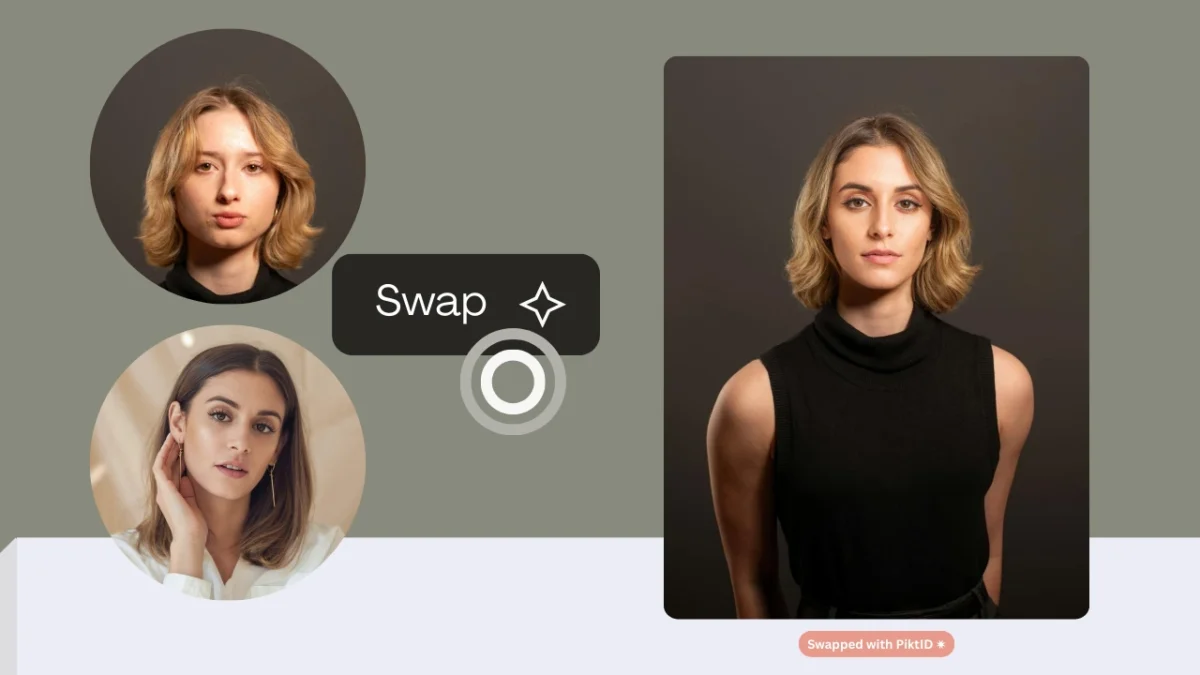
AI model face swap technology is reshaping how brands and creators produce professional visual content. Instead of focusing on entertainment or casual edits, this approach is designed for commercial-quality results where realism and consistency matter.
PiktID’s Swap module delivers model-grade outputs by handling critical technical details such as:
- Photorealistic identity blending
- Accurate hairline and forehead integration
- Lighting and tone alignment with the base model
- High-resolution texture preservation
- Natural expression and pose consistency
This makes AI model face swap fundamentally different from standard face swap apps, which often prioritize speed or fun over accuracy.
Where It’s Useful
- E-commerce model photos
- Fashion lookbooks
- Product photography
PiktID enhances this workflow through both the Studio interface and the Swap API, enabling creators and enterprises to generate single images or scale large batches with predictable, high-quality results. The combination of professional controls, realistic output, and API automation gives PiktID a clear advantage over casual face swap tools in the market.
Quick Takeaways
- AI Model Face Swap technology enables creators to produce high-quality, realistic images quickly, transforming visual content production.
- PiktID’s Swap module offers advanced features like photorealistic identity blending and high-resolution texture preservation, making it superior to standard face swap tools.
- The technology is particularly useful for e-commerce, fashion lookbooks, and product photography, streamlining workflows for professionals.
- Users benefit from the Swap API for batch processing, enabling fast and consistent output across large image sets.
- Ethical use of AI Model Face Swap requires consent and compliance with privacy standards, ensuring responsible content creation.
1. What Is AI Model Face Swap?

AI model face swap is the process of replacing an identity within a model photo while keeping the original pose, lighting, and skin texture intact. It is not simply pasting a face onto another; the system reconstructs the identity so it blends seamlessly into the existing environment.
Key Elements It Preserves
- Facial angle and perspective
- Lighting direction and shadows
- Skin texture and micro-details
- Hair strands and jawline transitions
- Neck shading and fabric alignment near the face
This is why model-grade AI model face swap requires more precision than standard face swap tools.
How Model-Grade Face Swap Differs
- Maintains consistent identity across multiple photos
- Uses high-resolution blending techniques
- Ensures natural hairline integration
- Preserves clothing shadows and neckline realism
- Avoids the cartoonish effects common in basic apps
Why It Matters Today
Creators across multiple industries are adopting AI model face swap because it reduces production time and improves visual consistency.
Major user groups include:
- Fashion brands needing fast, consistent lookbooks
- E-commerce sellers wanting diverse product photos
- Influencers creating content variations
- Digital marketers producing campaign assets
- Photographers testing multiple looks without new shoots
With growing demand for faster content creation and lower production costs, AI model face swap is becoming a core tool in modern visual workflows.
2. Why AI Model Face Swap Is Trending

Users want fast, high-quality model images without hiring talent or organizing full photoshoots. Platforms like Remaker AI, Higgsfield, Magic Hour AI and VModel AI are built for entertainment or casual edits. The audience now searching for AI model face swap wants something different: commercial-grade visuals.
i. Key Reasons
- Instant model generation instead of organizing paid shoots
- Remote content production for teams spread across different locations
- Consistent brand lookbooks across multiple outfits and product collections
- Reliable UGC replication without needing an influencer or model present
- Affordable content creation for e-commerce sellers and fashion brands
These trends directly contribute to the growth of AI model face swap tools that can deliver professional results.
ii. What Competitors Struggle With
Most popular tools have limitations when used for model photography:
- Over-smoothing that removes natural texture
- Incorrect lighting where the swapped face doesn’t match the scene
- Identity inconsistency across multiple product photos
- Hairline and forehead mismatches
- Cartoonish or unrealistic blending in certain lighting conditions
iii. Why This Leads to PiktID
These weaknesses create an opportunity for advanced systems like PiktID that:
- Focus on realism
- Maintain model identity across photos
- Produce e-commerce–ready quality
- Handle lighting and tone accurately
Swap by PiktID is built specifically to solve the problems competitors leave unaddressed.
3. Introducing Swap by PiktID — What Makes It Different

Swap by PiktID is purpose-built for high-quality AI model face swap workflows. Instead of simple face overlays, PiktID reconstructs the identity using lighting, texture, and expression mapping so the final output looks like a real photoshoot.
i. Key Differentiators
PiktID stands out for the following technical advantages:
- Lighting-aware swap engine that matches shadows, highlights, and temperature
- Natural skin tone integration for consistent complexion
- High-resolution texture preservation for pores, hair strands, fabrics, and fine details
- Hairline, forehead, and jaw alignment for accurate structure
- Consistent clothing and neckline transitions to avoid mismatched boundaries
- Realistic eye direction and micro-expressions to preserve authenticity
- Works with Generate Person models to create new, photorealistic identities
- Supports anonymized synthetic identities for GDPR compliance
These features directly address the realism issues common in typical AI model face swap tools.
ii. Full PiktID Ecosystem Advantage
Swap by PiktID becomes even more powerful when combined with other PiktID modules:
- Upscale to sharpen details and remove blur
- Change Expression to adjust eye direction or facial emotion
- Edit Background to create e-commerce or studio-style scenes
- Create Image for generating outfits and new product looks
- Swap API for automating hundreds or thousands of face swaps at scale
Together, these tools create a production-ready pipeline for fashion brands, influencers, photographers, and e-commerce sellers who rely on AI model face swap for consistent visual output.
4. Step-by-Step Guide: How to Do AI Model Face Swap Online

This section walks through the exact process of creating a professional AI model face swap using PiktID Studio. The goal is to ensure every swap looks natural, accurate, and aligned with commercial-grade standards. Whether you are producing fashion lookbooks, e-commerce product photos, or social media assets, the following workflow ensures consistent and high-quality results.
Step 1: Choose your base model photo
The foundation of any AI model face swap starts with selecting the right base image. The pose should match the reference face you intend to use, as consistent angles result in more realistic blends. Forward-facing or slightly angled model poses work particularly well because they give the AI a clear structure for facial alignment.
Avoid extreme side profiles, heavy shadows, or dramatic tilt angles, as these create mismatches during the AI model face swap process. The lighting should be soft, even, and diffused to maintain consistent skin tones once the swap is applied. Harsh lighting, overexposure, or backlighting can reduce the accuracy of final outputs.
Step 2: Upload your reference face
Next, upload the reference face that you want to apply to the model image. For the best AI model face swap results, use a natural, front-facing reference photo with clear visibility of facial features. A neutral expression works best, as it provides more flexibility for later expression adjustments.
Avoid images with obstructions such as sunglasses, heavy hair covering the face, masks, or accessories that break the facial outline. These occlusions limit the AI’s ability to detect landmarks and produce accurate swaps. Clear, high-resolution reference faces consistently deliver the strongest results.
Step 3: Apply Swap with PiktID
Once both images are uploaded, apply the face swap using PiktID’s Swap tool. During the AI model face swap process, the system analyzes a range of technical parameters to ensure realistic and seamless integration:
- Pose: Evaluates head angle and orientation to match the target image.
- Texture: Ensures that skin texture, pores, and fine details blend naturally.
- Lighting: Matches brightness, shadows, and color temperature between the two faces.
- Hairline: Corrects the boundary between the model’s hair and the swapped identity to avoid unnatural edges.
This automated analysis creates a more accurate and natural model-grade swap than standard consumer face-swap tools.
Step 4: Adjust expression or gaze (optional)
After the initial AI model face swap is generated, you can refine expression or eye direction using PiktID’s Change Expressions tool. Adjustments such as soft smiles, neutral expressions, or corrected gaze lines help align the swapped face with the original model’s posture and emotional tone. This step is especially useful for e-commerce product images and fashion shoots where consistent expressions improve brand cohesion.
Step 5: Enhance with Upscale
Once the expression is finalized, use PiktID’s Upscale tool to increase resolution and enhance image clarity. For high-quality AI model face swap outputs, upscaling helps restore texture, remove blur, and produce print-ready images.
This is essential if you plan to use the visuals for marketing campaigns, storefront banners, or large display placements. Upscale ensures the final output meets professional resolution standards while maintaining natural detail.
Step 6: Export high-resolution image
Finally, export the image in a high-resolution format suitable for your platform. PiktID supports common formats such as JPG, and PNG, ensuring compatibility across digital and print use cases.
Recommended dimensions for major platforms:
- Amazon: 2000 × 2000 px or higher for zoom functionality
- Shopify: 2048 × 2048 px for consistent displays
- Instagram: 1350 × 1080 px for portrait posts
- Catalogs & Lookbooks: 300 DPI print-ready resolution
Following these specifications ensures your AI model face swap visuals maintain clarity across all channels.
5. API Workflow: Face Swap at Scale Using Swap

For teams and businesses needing high-volume AI model face swap automation, the Swap API provides a scalable and efficient solution. While the Studio workflow is ideal for individual creators, designers, and photographers, the API workflow is built for automation, batch editing, and integration into existing content pipelines.
i. Swap API Endpoints Overview
The Swap’s API offers endpoints for uploading base images, submitting reference faces, running swap operations, and retrieving final results. Each endpoint is designed for high throughput, enabling consistent, rapid processing of large image sets.
Typical endpoints include:
- Image upload endpoint
- Face reference upload endpoint
- Swap execution endpoint
- Retrieval endpoint for final assets
These allow developers and agencies to trigger AI model face swap tasks programmatically without manual uploads.

ii. When to Use API Over Studio
The Swap API is ideal for projects requiring automation or scale. Examples include:
- Agencies producing hundreds of product photos per week
- E-commerce companies maintaining large seasonal catalogs
- Photographers who need automated identity swapping for entire photo sets
- Fashion brands generating multiple AI model face swap look books using the same synthetic identity
- AI model automation pipelines where identity consistency is required across large volumes of output
In these cases, the API reduces manual effort and ensures uniform quality.
Developers can loop through image arrays and pass parameters such as lighting correction, identity IDs, or output format preferences. This enables precise control over each AI model face swap task.
iii. Tips for Batch Processing 100+ Photos
When generating AI model face swap results in bulk, follow best practices to ensure consistency and speed:
- Pre-standardize lighting across base images for uniform output.
- Use high-resolution reference faces to maintain detail across the batch.
- Automate logging to track failed or incomplete swaps.
- Run Upscale automatically after each swap for catalog-quality resolution.
- Store identity references centrally to maintain consistent model appearance across thousands of photos.
By leveraging the Swap API, creative teams and product-focused enterprises can streamline production and maintain a consistent visual identity across all assets.
6. Best Practices for Getting Perfect Face Swap Results

Achieving high-quality results with AI model face swap depends on the clarity of your images, the accuracy of pose alignment, and how well the swapped identity matches the original frame. The following best practices help ensure natural, professional outcomes every time.
i. Image Quality Tips
High-quality source images make the swap more realistic. Poor-quality images lead to mismatched textures, visible seams, and unnatural blending.
Use the following guidelines:
- Maintain similar lighting direction across both images to avoid unnatural highlights.
- Avoid strong shadows that distort the nose, jawline, or cheek structure.
- Use higher-resolution images to help the system preserve texture and sharpness.
- Ensure the face has clear details, especially around the eyes, lips, and hairline.

ii. Model Selection Tips
The AI model face swap engine performs best when the base image and reference image share similar angles and expressions.
For natural results:
- Choose poses with similar head tilt and camera angle.
- Ensure comparable distances between the camera and the model.
- Use neutral or natural expressions to avoid mismatched emotional cues.
iii. Troubleshooting Common Issues
If results look slightly off, the following checks usually solve the problem:
- Face appears stretched: the angle or pose between the two images is mismatched.
- Skin tone mismatch: lighting conditions differ significantly; use a base image with cleaner illumination.
- Incorrect hairline: select a reference image with a clear view of the forehead.
- Expression mismatch: use PiktID’s Change Expressions to correct gaze or emotion.
- Soft or blurry output: run the image through PiktID Upscale for final sharpness.
7. Real Use Cases

The AI model face swap workflow is not just for editing—it is now a core part of visual production pipelines across fashion, e-commerce, influencer marketing, and studio content creation. Below are real-world examples of how different industries use this technology.
i. Fashion and Apparel Brands
Brands rely on consistent model identity to maintain a unified visual style across campaigns.
Typical uses include:
- Creating consistent identities across entire collections without hiring multiple models.
- Building cohesive lookbooks with aligned lighting and poses.
- Producing outfit variations quickly when reshoots are not possible.
ii. E-commerce Sellers
Online sellers need fast, high-quality product images for competitive marketplaces.
Common applications:
- Amazon, Shopify, and Etsy product listing photography.
- A/B testing different model faces to improve conversions.
- Generating seasonal campaigns or variants without arranging new photoshoots.
iii. Influencers and Personal Brands
For influencers, visuals are a core part of identity and engagement.
They use AI model face swap for:
- High-quality UGC without hiring models.
- Thumbnail images for YouTube, Instagram, and TikTok.
- Building consistent personal branding or themed personas.
iv. Photographers and Content Studios
Studios use the tool not as a gimmick, but as a way to optimize production.
Practical uses include:
- Virtual reshoots when lighting or expressions need correction.
- Preparing mood board mockups for clients before real shoots occur.
- Fast revisions when clients request a different look, mood, or identity.
8. Comparison Table: PiktID vs Other Face Swap Tools
Choosing the right platform for AI model face swap depends on how realistic, consistent, and production-ready your results need to be. Most tools focus on casual face changes, but only a few deliver the quality required for model photography, e-commerce listings, and brand visual consistency.
Below is an easy-to-read breakdown of how PiktID compares to leading competitors.
i. Why Comparisons Matter
Most AI model face swap tools struggle with:
- Inconsistent lighting
- Low skin-tone accuracy
- Hairline or jawline distortion
- Over-smoothed, unrealistic texture
- No ability to reuse the same model identity
- No automation for bulk product photos
PiktID directly solves all of these issues with a professional-grade Swap engine.

ii. Summary of Key Competitive Insights
PiktID excels because it offers:
- Photorealistic model-grade output
- Accurate skin tone blending
- Lighting-aware facial integration
- Natural hairline and jaw alignment
- Consistent identity reuse for lookbooks and catalogs
- API support for large teams and batch workflows
Most competitors are built for:
- Fun edits
- Social sharing
- Quick swaps that don’t hold up in commercial photography
- No identity storage or automation
iii. Comparison Table
| Feature | PiktID | Remaker AI | Higgsfield | MagicHour | VModel |
| Realistic model-grade swaps | ✓ | ~ | ~ | ~ | ~ |
| Skin tone accuracy | ✓ | ~ | ~ | × | ~ |
| Lighting preservation | ✓ | ~ | × | × | × |
| Hairline + jaw alignment | ✓ | × | × | × | × |
| E-commerce suitability | ✓ | × | × | ~ | × |
| Identity reuse | ✓ | × | × | × | × |
| API automation | ✓ | × | × | × | × |
Symbols:
✓ = Strong
~ = Average
× = Weak
iv. What This Means for Users
If you need AI model face swap for:
- E-commerce product images
- Fashion lookbooks
- Consistent brand models
- High-resolution catalogs
- Automated batch workflows
- Professional photography replacements
PiktID is the only tool in this list designed for real commercial use, not just entertainment.
9. Ethics, Legality & Privacy Notes

Using AI model face swap responsibly is essential, especially when creating images for advertising, commercial use, or public distribution. Below is a clear, easy-to-read summary of ethical and legal guidelines.
i. Responsible AI Usage
When using AI model face swap tools, you should:
- Use images you own or have permission to use
- Avoid placing someone’s face on another body without their consent
- Avoid using public figures’ faces for commercial content
ii. Consent-Based Swapping
Always ensure:
- You have explicit permission from the person whose face you are using
- Consent is documented if images will be used in campaigns or ads
- You don’t impersonate real individuals for misleading purposes

iii. GDPR Compliance With Synthetic Identities
PiktID solves privacy issues through:
- Anonymize, which generates synthetic, GDPR-safe faces
- Synthetic identities that match no real person
- Fully safe usage for e-commerce, branding, and model catalog creation
This is particularly important for global brands operating in privacy-regulated regions.
iv. Why AI model face swap Is Legal in Commercial Work
It is legal when:
- You use synthetic faces generated by PiktID
- You use faces you legally own or have licensed
- You avoid using real individuals without permission
- You do not create deceptive or harmful content
Using synthetic model identities ensures:
- No likeness violations
- No personality-rights issues
- No consent disputes
- No privacy infringement
v. The Safe and Scalable Path
By following these principles, brands and creators can confidently use AI model face swap technology for:
- Fashion photography
- Product images
- Model catalogs
- Social media promotions
- E-commerce listings
All while staying compliant, ethical, and privacy-safe.
10. Conclusion

The growing demand for high-quality digital content has made AI model face swap technology essential for brands, photographers, and creators who need consistent and professional visuals at scale. Instead of relying on costly photoshoots or inconsistent user-generated assets, teams can now create stable model identities, refine product visuals, and update campaigns instantly. With AI model face swap workflows, businesses can align lighting, tone, expressions, and hair integration across an entire catalog, ensuring the same level of quality that would normally require extensive production resources.
This shift is particularly valuable for fashion and e-commerce brands that need to produce large volumes of product imagery with accurate and repeatable results. Creators and marketers can also experiment with multiple looks, poses, and faces without re-shooting content. By integrating tools such as Change Expressions, Upscale, and Generate Person, the AI model face swap process becomes a complete visual production system that supports commercial-grade outputs.
If you want to streamline creative workflows, reduce operational costs, and deliver professional model visuals consistently, adopting AI model face swap technology is a competitive advantage that directly impacts content quality and brand perception.
Ready to create flawless model visuals? Try PiktID Swap with 10 free credits.
Visit https://studio.piktid.com/swap to get started today.
11. FAQs - AI model face swap
1. What is an AI model face swap?
AI model face swap is a technique that replaces the face in a model photo with another identity using artificial intelligence. The goal is to maintain the original lighting, pose, clothing, and background while introducing a new, realistic face that blends naturally into the image. This method is widely used in fashion, e-commerce, and content creation because it produces studio-quality visuals without needing additional photoshoots.
2. How does PiktID produce realistic model-grade face swaps?
PiktID uses a multi-layered analysis system that evaluates facial structure, lighting direction, and skin texture before applying the new identity. The engine ensures that the swapped face matches the original environment, which creates a seamless result. It also adjusts micro-expressions, maintains natural skin tones, and aligns the hairline and jawline, making the final AI model face swap look as if it were shot in a real studio.
3. Is AI model face swap legal for commercial use?
Yes, AI model face swap can be used legally for commercial projects when the images involved are properly owned or licensed. Brands often use synthetic faces or consent-based images to avoid intellectual property issues. Using synthetic identities, such as those generated with PiktID Anonymize, ensures full compliance with privacy and advertising guidelines.
4. How can I fix lighting or skin tone mismatches after swapping?
Lighting or tone issues usually occur when the base image and the reference face have different lighting environments. To improve results, use well-lit source photos and ensure the reference face is clear and evenly illuminated. If the final output still needs refinement, PiktID tools such as Change Expressions or Upscale can help correct tone inconsistencies and sharpen textures for a more natural finish.
5. What types of photos give the best results for AI model face swap?
Photos with clear, unobstructed views of the face generally produce the most realistic swaps. Even lighting, neutral expressions, and minimal shadows help the AI blend the new identity smoothly. High-resolution images also improve accuracy because they provide more detail for the model to analyze and match.
6. How is a model-grade face swap different from a regular face swap?
A model-grade AI model face swap prioritizes high-resolution quality and commercial realism. It is designed for lookbooks, product images, and brand visuals where lighting, texture, and identity consistency matter. Regular face swap tools are often used for entertainment and may produce results that look unrealistic or mismatched, making them unsuitable for professional use.
7. Can I use AI model face swap for e-commerce product listings?
Yes, this is one of the most common applications. Brands use face swap technology to maintain consistent model presentation across large product catalogs. It allows businesses to update model faces, create seasonal variations, or tailor visuals to specific demographics without scheduling new photoshoots or hiring additional models.
8. How does the Swap API handle batch processing for large catalogs?
The Swap API automates AI model face swap tasks by processing multiple images in a single workflow. It can apply the same identity across hundreds of photos, manage lighting and tone consistency automatically, and integrate directly into e-commerce or studio pipelines. This is ideal for fashion brands or agencies that need rapid, large-scale image generation.
9. Can I save and reuse a model identity across multiple images?
Yes, PiktID supports identity storage, allowing you to reuse a face across as many images as needed. This is useful for creating full lookbooks or building a virtual model for your brand. Synthetic identities generated through Anonymize can also be reused, ensuring consistency while maintaining full privacy compliance.
10. Where can I try AI model face swap for free?
You can try it directly through PiktID Studio, which includes 10 free credits for new users. The platform allows you to upload your images, apply face swaps, enhance the results, and download high-quality outputs without limitations. Start here: https://studio.piktid.com/swap