
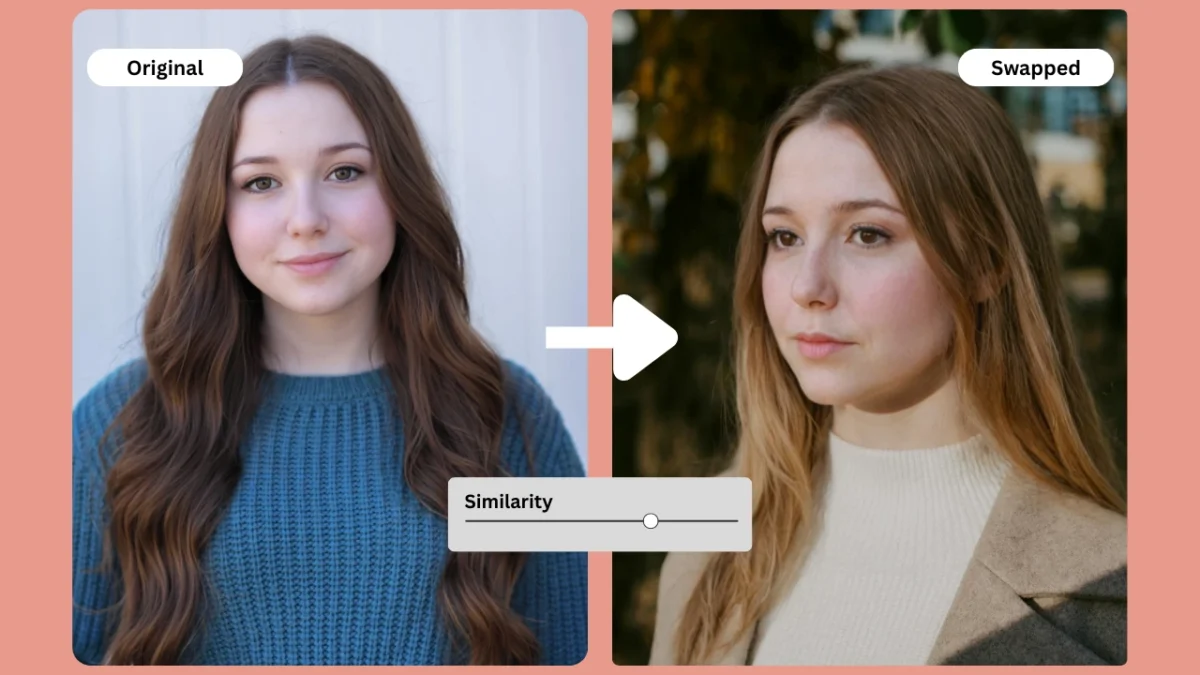
AI-based face swapping has become a mainstream visual tool used across social media, fashion look books, Ecommerce product images, and creative content. Today, creators and brands want to swap face in photo with results that look natural, well lit, and commercially usable. The demand is no longer limited to fun edits; it now supports full scale content production.
The Problem With Most Tools
Traditional face swap editors often create:
- Poorly blended skin tones
- Harsh or mismatched lighting
- Plastic, blurred textures
- Visible edges around the jawline and hairline
- Inconsistent model identity
These issues make most tools unsuitable for professional or brand level work.
How PiktID Solves It
PiktID delivers:
- Realistic skin tone matching
- Natural hairline and forehead blending
- Lighting-aware swaps
- Identity alignment for lookbooks and catalogs
- High-resolution output ready for commercial use
Key Takeaways
- AI-based swap face in photo is now essential for brands, offering natural results for professional use.
- PiktID excels by providing features like realistic skin tone matching, lighting adjustments, and high-resolution outputs.
- The platform supports workflows ensuring model consistency and privacy compliance, making it suitable for enterprise use.
- Users can easily swap face in photo using PiktID’s intuitive studio and advanced workflows for fashion or marketing.
- PiktID stands out among competitors by delivering photorealistic results while maintaining GDPR-safe practices.
Estimated reading time: 14 minutes
What this Guide Covers
1. Why People Want to Swap a Face in a Photo
The desire to swap face in photo has expanded from casual fun to a practical, professional necessity. Modern visual production needs speed, diversity, and identity safety—three things traditional photo shoots cannot always deliver.

Key Reasons Behind the Demand
- Model diversity without large photography budgets
Brands want multiple model variations for the same product. - Identity-safe visuals for compliance
Fashion and Ecommerce companies require GDPR-aligned content using synthetic faces. - Consistent model identity across campaigns
One face reused across 50–500 product images helps maintain a brand’s visual signature. - Creativity without technical complexity
Social media creators want simple tools that let them swap face in photo without Photoshop.
How AI Solves These Issues
Advanced AI uses:
- Facial landmark detection
- Identity embedding
- Lighting and shadow simulation
- Skin texture reconstruction
These technologies allow creators to swap face in photo while maintaining realism and accurate detail.
Privacy Considerations
With growing concerns around data misuse, companies now require:
- Synthetic identities
- GDPR-safe image workflows
- Stored identities for consistent usage
This leads naturally into the professional capabilities offered by PiktID Swap, which combines realism, compliance, and production quality output.
2. What Makes PiktID Different from Other Face Swap Tools
This section explains why PiktID delivers more reliable, model grade results compared with common online tools. While many platforms allow users to swap face in photo for casual edits, PiktID is engineered for high precision work used in fashion, Ecommerce, advertising, and enterprise level visual production.

2.1 Realistic Identity Blending
PiktID uses advanced boundary aware facial mapping to ensure that every time users swap face in photo, the identity transfer looks natural rather than pasted on. The system analyses facial landmarks, skin curvature, cheek structure, and the alignment of the jaw to avoid distortion.
Hairline handling is one of the biggest challenges in most face swap applications. PiktID predicts the correct forehead shape, fills micro gaps between hair strands, and blends the new identity without creating blur lines. This results in more realistic model imagery that works well on catalog photos or close up portraits.
2.2 Lighting & Tone Match
Many free tools fail when lighting conditions differ between the source and target images. When users swap face in photo using PiktID, the system automatically adjusts exposure, white balance, shadow intensity, and color temperature. This preserves the visual consistency of the original image and prevents unnatural contrast or mismatched tones around the face, neck, or shoulders.
2.3 Consistent Model Creation
PiktID allows brands to create reusable synthetic models by pairing Anonymize with SwapID. This means that after generating a synthetic identity, users can repeatedly swap face in photo across hundreds of outfits or product shots. This workflow is ideal for look books, multi SKU catalogs, or influencer-style brand assets where continuity matters.
2.4 High-Resolution Outputs
High-resolution output is essential for print media, marketplace listings, and professional advertising. After users swap face in photo, PiktID’s Upscale module restores texture, enhances sharpness, and removes pixelation without introducing artifacts. This ensures that even large format exports maintain photo realistic detail.
2.5 Multi-Tool Ecosystem
PiktID’s strength lies in its integrated workflow. Users can swap face in photo and then refine the final look with Edit Background, Change Expressions, Generate Person, and Create Image. This ecosystem supports visual production for fashion brands, product photography teams, and creative studios developing large volumes of content with consistent stylistic direction.
3. How to Swap Face in Photo Using PiktID
3.1 Studio Workflow

The Studio interface is designed to help anyone easily swap face in photo with professional quality results.
- Open PiktID Swap: https://studio.piktid.com/swap
- Upload your target image (the photo where the face will be replaced).
- Upload your source face image (the identity you want to transfer).
- Generate the swap and review the natural blending and lighting alignment.
- Use Upscale to boost clarity, texture, and resolution if needed.
- Download the final high resolution output for Ecommerce, social media, or print.
This workflow is suitable for creators, marketers, influencers, and small businesses looking for quick but polished edits.
3.2 Advanced Workflow: Brand/Model Consistency
For fashion brands, catalog teams, and studios producing multiple images, PiktID supports a scalable workflow using synthetic identities.
- Use Anonymize to generate and save a synthetic brand model.
- Apply that model whenever you swap face in photo across different outfits using SwapID.
- Use Edit Background to maintain a uniform brand aesthetic for campaigns or product lines.
- Apply Upscale for sharp, print ready images suitable for look books or marketplace listings.
This ensures the same model identity appears consistently across an entire collection without needing new photo shoots.
3.3 API Workflow (For Developers)
Developers building applications, SaaS tools, or Ecommerce automation systems can integrate PiktID’s SwapID API. Documentation: https://docs.piktid.com/docs/swap/
Key elements of the JSON body include:
- source_face: Base64 of the identity face
- target_image: Base64 of the image where you want to swap face in photo
- blend_strength: Controls the intensity of blending
Typical use cases:
- Automated product photo shoots
- Multi-SKU lookbook generation
- Model consistency in marketplaces
- Creative apps that let users instantly swap face in photo in real time
This workflow enables large-scale, automated production with consistent output quality.
4. How Other Tools Swap Faces
Most tools that rank for queries related to swap face in photo workflows are built for entertainment, social media, or casual editing. They perform well on simple images but struggle with lighting, texture, and identity consistency required for professional model photography. Below is a clear, quick-read breakdown of what each competitor does well and where they fall short.

4.1 Remaker AI (FaceVary)
Strengths
- Free and extremely popular (millions of users).
- Good for quick attempts to swap face in photo content.
- Minimal setup; works instantly.
Limitations
- Frequent lighting mismatches.
- Skin tones often look inconsistent.
- Not suitable for Ecommerce or fashion level realism.
Best For: Fun edits, not professional model work.
4.2 Canva Face Swap
Strengths
- Very simple interface.
- Quick for social media style swaps.
- Works well for basic graphic content.
Limitations
- Not designed for photo-realistic face integration.
- Image compression lowers quality.
- Struggles with detailed textures when users try to swap face in photo outputs for commercial use.
Best For: Social posts, casual content.
4.3 MagicHour AI
Strengths
- Free and requires no sign-up.
- Fast results for single face swaps.
Limitations
- Limited control over blending.
- Visuals often appear filtered rather than realistic.
- Not dependable for consistent model photography.
Best For: Quick experiments, not detailed work.
4.4 Pixlr
Strengths
- Simple editing environment.
- Beginner-friendly workflow.
Limitations
- Weak on photorealistic face replacement.
- Edges may appear smoothed or artificial.
- Not reliable when users need to swap face in photo images with high-detail requirements.
Best For: Everyday casual edits.
4.5 Fotor
Strengths
- Clean UI and decent quality outputs.
- Produces visually appealing results.
Limitations
- Lean more toward stylized effects than realism.
- Identity consistency is difficult across multiple images.
- Not ideal for professional model photography or fashion brand usage.
Best For: Stylized visuals, beauty effects.
Final Takeaway
When reviewing all leading platforms, one pattern becomes clear:
- Most tools are designed for fun and social content.
- Nearly all struggle with lighting consistency, tone blending, hairline alignment, and model-grade realism.
- None offer identity consistency or GDPR-safe synthetic faces for repeated commercial use.
This makes PiktID the only platform intentionally built for professional, brand-consistent, photorealistic swap face in photo workflows used in e-commerce, fashion, photography, and enterprise production.
5. Comparison Table: PiktID vs Competitors

Below is a high-level comparison of PiktID against the leading platforms. The table highlights capabilities essential for those who want to swap face in photo projects for professional or commercial outcomes.
| Feature | PiktID | Remaker AI | Canva | MagicHour AI | Fotor |
| Realistic blending | Yes | Partial | No | Partial | Partial |
| Lighting correction | Yes | No | No | No | Partial |
| Hairline, mouth, and eye alignment | Yes | Partial | No | No | Partial |
| High-resolution preservation | Yes | Partial | No | Partial | Partial |
| Free credits | Yes (10 credits) | Yes | Limited | Yes | Limited |
| GDPR-safe identity system | Yes | No | No | No | No |
| Consistent model generation | Yes | No | No | No | No |
This comparison shows that while many tools can swap face in photo content for casual use, only PiktID meets the criteria required for professional visual production, identity consistency, and enterprise-grade workflows.
6. Best Practices to use PiktID’s Troubleshooting & Tips

When you swap face in photo workflows, small decisions around lighting, image resolution, and head position dramatically influence the final result. These best practices ensure sharper blending, cleaner skin tones, and more realistic model-grade outcomes.
i. Use high-resolution source and target images
Low-resolution uploads limit how accurately an AI model can detect facial landmarks.
High-res images provide:
- Clearer skin textures
- Better jawline definition
- More accurate hairline mapping
- Reduced blending artifacts
ii. Match head angles and lighting direction
To swap face in photo scenarios effectively, keep both images visually aligned.
- Use similar camera angles
- Avoid photos shot from extreme high or low positions
- Ensure lighting direction is consistent (left-lit → left-lit)
- Prevent shadows from covering facial features
iii. Avoid cropped chins, missing hairlines, or obstructed faces
AI produces the best swap when all major landmarks are visible.
Problem inputs include:
- Hair covering large portions of the face
- Missing forehead or chin
- Strong occlusions (hands, scarves, large glasses)

iv. Use Upscale after swapping
Upscale improves:
- Overall clarity
- Fabric textures in outfits
- Facial detail sharpness
- Print-ready resolution for catalogs or ads
v. Adjust expressions using Change Expressions
Expression mismatches often occur when you swap face in photo inputs with different emotions.
Use Change Expressions when:
- One face is smiling and the other is neutral
- Eye direction is inconsistent
- Brows or micro-expressions don’t match the base model
vi. Use Edit Background for a professional finish
After swapping:
- Replace cluttered backgrounds
- Align image style with your brand theme
- Use clean studio backdrops for e-commerce
vii. Avoid overly stylized or unrealistic AI faces
When photorealism is required:
- Keep natural texture
- Avoid filters that soften or distort features
- Use realistic lighting and tones
7. Use Cases: Where Face Swap Helps Creators and Businesses
Tools that swap face in photo workflows are reshaping content creation across fashion, marketing, influencer campaigns, and enterprise operations. Below is a viewer-friendly breakdown of where this technology adds real value.

7.1 Fashion and Lookbooks
Using AI to swap face in photo content is now common across fashion teams because it reduces dependency on repeated photoshoots.
Key benefits:
- Create consistent model identities across entire collections
- Produce lookbooks faster and with fewer resources
- Test multiple outfits on the same model
- Maintain branding consistency across seasons
Practical uses:
- A/B testing different audiences with alternate model faces
- Quickly generating sample visuals before final production
- Creating campaign variants for different markets
7.2 Marketing and Advertising
Marketers rely on AI-driven face swapping to localize campaigns and test creative variations.
Why it matters:
- Localized campaigns perform better across regions
- Demographic diversity increases engagement
- Faster turnaround for seasonal or thematic campaigns
How teams use it:
- Generate multiple demographic versions with Generate Person + Swap
- Adapt the same asset for USA, LATAM, Europe, and Asia
- Produce market-ready visuals without additional shoots

7.3 Influencer Content and UGC
Influencers increasingly swap face in photo assets to streamline content production and refine their visual identity.
Benefits:
- Fast try-on visuals for fashion or beauty
- Update makeup or hairstyle variations without reshooting
- Correct facial expressions when lighting or angles go wrong
- Produce daily content without constant new photoshoots
Common applications:
- Thumbnails
- Reels and shorts
- Product try-ons
- UGC samples for brand collaborations
7.4 Enterprise and Privacy
Enterprises use face swapping not for creativity, but for compliance and data protection.
Why enterprises use this workflow:
- Anonymize → Swap ensures all images remain non-identifiable
- Protects employee and customer identities
- Ensures GDPR compliance for case studies and training datasets
Key scenarios:
- Customer support training materials
- Case study photographs
- Internal documents requiring privacy preservation
- Machine learning datasets where real identities must not appear
8. Ethics and Privacy Considerations

Swapping faces in digital media is inherently sensitive because it involves identity, representation, and the potential misuse of personal imagery. When users choose to swap face in photo projects, they often do not realize the legal and ethical implications surrounding consent, biometric privacy, or the risks of impersonation. PiktID is designed with strict privacy and compliance frameworks to ensure users can safely generate content while avoiding the pitfalls associated with deepfake misuse.
A major advantage of PiktID is its adherence to GDPR standards through the use of synthetic identities. Instead of relying on real faces, users can anonymize images or create entirely new identities with Anonymize or Generate Person. This allows brands and creators to swap face in photo scenarios without exposing real individuals to privacy risks. The synthetic identity workflow ensures that no personally identifiable information is ever used, stored, or processed.
Consent remains a critical guideline when performing any swap face in photo action, especially when using real individuals. PiktID encourages users to have appropriate permissions before uploading or manipulating someone’s likeness. The platform stores no biometric identifiers such as facial scans, embeddings, or recognition vectors. All processing happens securely, and no data is retained after the task is completed.
To further protect users, PiktID clearly disallows harmful use cases such as political deepfakes, impersonation, harassment, or misleading narratives. The recommended workflow for sensitive projects is the combination of Anonymize and Swap, ensuring that creators can produce high-quality, commercially safe images while respecting privacy standards. By using synthetic models, e-commerce sellers, fashion brands, and marketers can scale consistent imagery without involving real identities or risking misuse.
9. Using PiktID as your Daily Editing Tool

AI-powered model face swapping has evolved from a casual novelty to a production-ready solution for fashion brands, e-commerce sellers, influencers, and creative teams seeking consistency and realism. The ability to swap face in photo environments with precision and natural detail simplifies workflows and reduces the reliance on traditional photoshoots. With PiktID, users benefit from lighting-aware blending, high-resolution texture handling, and identity-consistent results that fit seamlessly into professional campaigns.
The strength of PiktID lies in its complete ecosystem. Users can enhance clarity with Upscale, refine expressions with Change Expressions, anonymize models with synthetic faces, generate unique personas, or create new imagery from scratch. Each module is designed to complement the Swap tool, enabling a unified workflow that is faster, safer, and more adaptable than standalone face swap solutions.
Ready to create flawless AI visuals? Try PiktID’s Swap tool with 10 free credits.
Visit https://studio.piktid.com/swap to get started today.
10. FAQs - Swap Face in Photo

1. What is the easiest way to swap face in photo?
You can swap face in photo instantly using PiktID’s online Swap tool. Upload a base image and a reference face, and the system blends them automatically with natural lighting and texture consistency.
2. How does PiktID create realistic face swaps?
PiktID uses an advanced identity-aware blending engine that analyzes lighting, contours, and texture details to create a natural result. This produces realistic outcomes when you swap face in photo scenarios for commercial or creative use.
3. Can I swap faces in group photos?
Yes. You can upload a group picture and use the Swap tool to replace one or multiple faces. The engine adapts to different angles and lighting conditions to ensure consistent results.
4. Is swapping faces legal?
Swapping faces is legal when you have permission from the person whose face you are using or when using synthetic identities. PiktID encourages ethical use and offers anonymization tools for privacy-safe workflows.
5. Why does lighting mismatch happen in face swaps?
Lighting mismatch occurs when the base image and reference face were shot in different environments. Using well-lit images or adjusting expressions and tone can improve the outcome when you swap face in photo sessions.
6. How can I fix blurry face swap results?
Run the final image through PiktID Upscale to sharpen details, restore texture, and improve resolution. This is especially helpful for high-resolution product listings or marketing images.
7. What app produces the most realistic face swaps?
PiktID produces highly realistic results with advanced hairline alignment, tone matching, and texture preservation. It is built for creators who need professional outcomes rather than casual or entertainment-focused tools.
8. Can I use AI face swap for commercial projects?
Yes. With appropriate consent or synthetic identities, you can swap face in photo projects for Ecommerce, catalog shoots, advertising, and other commercial uses.
9. How to swap a face without Photoshop?
You can swap face in photo using PiktID’s online tool without needing any editing skills. Upload your images, choose the face to replace, and download the final output instantly.
10. Where can I swap faces in a photo for free?
You can try face swapping for free using PiktID’s Swap tool, which offers 10 free credits to start. Visit https://studio.piktid.com/swap to begin.